
What Bank Details Should You Put on an Invoice? UK Guide
If you want clients to pay an invoice by bank transfer, you need to give them the right information. This UK guide explains which bank details to include, what payment reference to request, what not to share, and how to make invoices easier to pay.
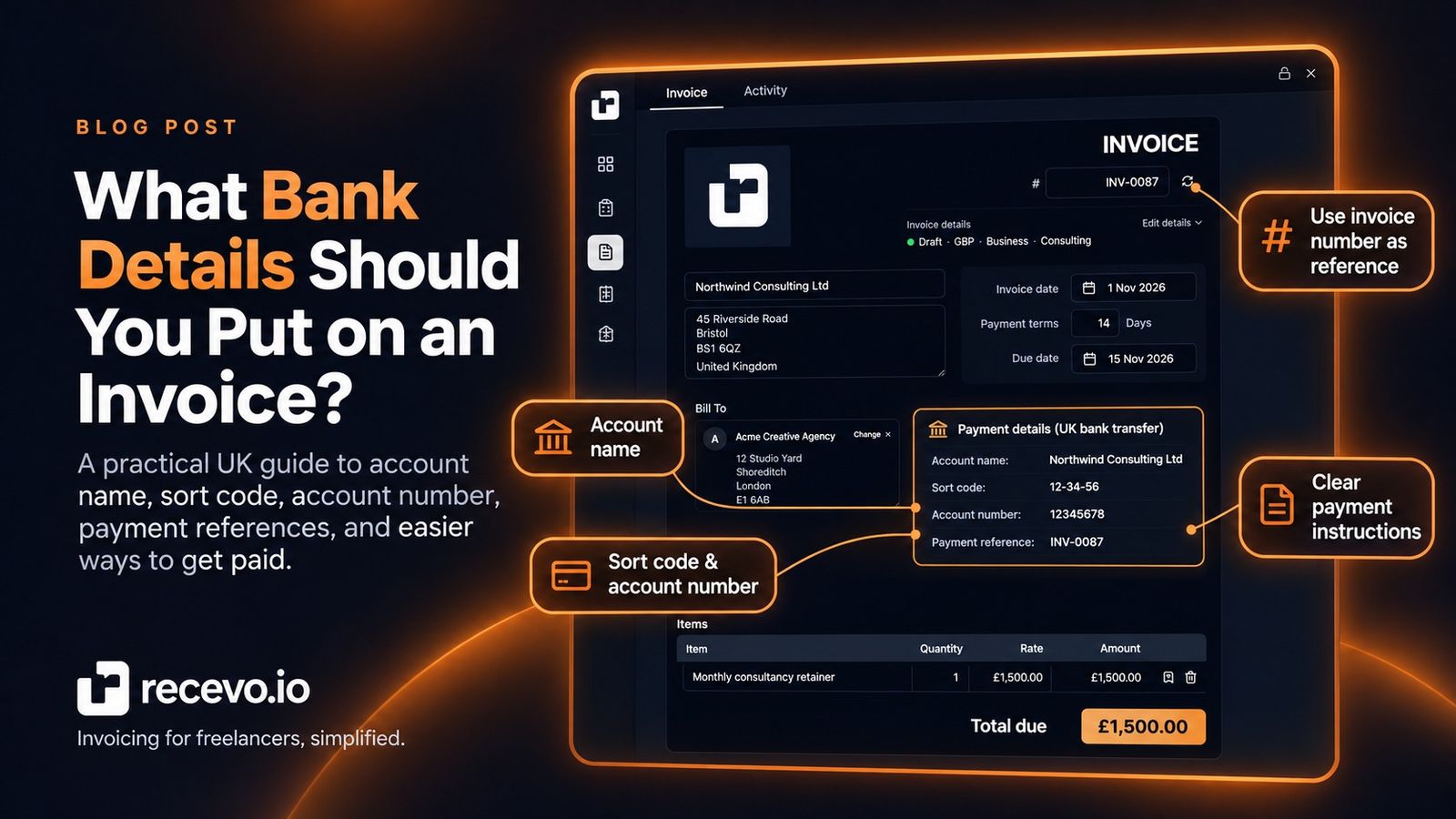
You have finished the work, created the invoice and told the client how much they owe.
There is one final question:
How are they actually going to pay you?
For many UK freelancers, sole traders and small businesses, bank transfer remains a simple way to collect invoice payments.
But your customer needs the right details.
Too little information can lead to another email asking where to send the money. Incorrect information can cause a much bigger problem. And if you give the client no payment reference, identifying which invoice they paid can become unnecessarily difficult later.
The good news is that the payment section of an invoice can be very simple.
For most UK bank transfers, the key details are:
- account name
- sort code
- account number
- a clear payment reference
You may also choose to show your bank name.
Let's look at each one.
Are bank details required on a UK invoice?
Bank details are useful, but they are not part of the general list of information GOV.UK says every UK invoice must contain.
The required information includes things such as your invoice number, supplier and customer details, invoice and supply dates, description of the goods or services, amounts, applicable VAT and the total owed.
That means there is a difference between:
information needed to make the invoice valid and understandable
and:
information the customer needs to actually pay it
If you expect payment by bank transfer, including your payment details directly on the invoice removes an unnecessary step for the customer.
The UK Small Business Commissioner recommends including bank details as part of clear payment instructions.
1. Account name
Start with the name attached to the bank account.
For example:
Account name: Taylor Design
or:
Account name: Taylor Smith
Use the actual account name your bank expects the payer to use.
This is increasingly important because UK banks use Confirmation of Payee when many customers set up a new recipient.
Confirmation of Payee checks the name entered by the person making the payment against the account associated with the sort code and account number. The payer may be told that the name matches, is a close match or does not match.
So avoid putting an informal trading name in the payment instructions if the bank account is held under a different name and that could confuse the check.
If you are unsure what account name customers should enter, check with your bank.
2. Sort code
For a normal UK bank transfer, include your six-digit sort code.
It is usually written like:
Sort code: 12-34-56
The sort code identifies the bank and branch or payment-routing location associated with the account.
Check every digit carefully before adding it to an invoice template.
A payment section is something you may reuse across hundreds of invoices, so a mistake copied into your standard template can create an ongoing problem.
3. Account number
Include the account number that should receive the payment.
A standard UK bank account number normally contains eight digits.
For example:
Account number: 12345678
Again, check it carefully against your banking app, online banking or official account information rather than typing it from memory.
Your customer will normally use the account name, sort code and account number together when setting you up as a payee.
4. Give the client a payment reference
This small detail can save a surprising amount of admin.
Tell the customer what reference to use when they transfer the money.
Usually, the simplest option is your invoice number.
For example:
Payment reference: INV-0087
The Small Business Commissioner specifically recommends considering the invoice number as the payment reference.
This becomes especially useful when:
- the same customer pays you regularly
- several invoices have similar values
- a customer has more than one outstanding invoice
- the company name shown by your bank is not immediately recognisable
- you are reconciling several payments at once
Imagine you have three invoices for £500.
Three £500 payments subsequently appear in the bank.
If the references are:
INV-0085INV-0086INV-0087
the job is straightforward.
If all three references simply say:
PAYMENT
you have more investigating to do.
Should you include the bank name?
You can.
For example:
Bank: Example Bank
For most ordinary UK electronic payments, the sort code and account number do the important routing work.
However, showing the bank name can make your payment instructions a little clearer, and the Small Business Commissioner's invoicing guidance includes bank name among the suggested payment details.
A clear payment block might therefore look like:
Payment by bank transfer
Account name: Taylor Design
Bank: Example Bank
Sort code: 12-34-56
Account number: 12345678
Reference: INV-0087
That is usually enough for a UK customer to understand what to do.
Where should bank details go on an invoice?
Make them easy to find.
A client should not need to search through paragraphs of notes to work out how to pay you.
A logical place is towards the bottom of the invoice near:
- the total amount due
- due date
- payment terms
- payment instructions
For example:
Total due: £850
Due date: 30 November 2026
Payment by bank transfer:
Account name: Taylor Design
Sort code: 12-34-56
Account number: 12345678
Reference: INV-0087
Keeping the information together creates a simple sequence:
how much to pay → when to pay → where to pay → what reference to use
Should you put personal bank details on a business invoice?
If you receive business income into an account that your bank permits you to use for that purpose, those are the payment details you may need to give the client.
But consider how you want to organise your finances.
Many sole traders prefer having an account specifically used for business transactions because it can make incoming payments and outgoing expenses easier to distinguish from personal spending.
Whatever account you use, make sure it is appropriate under your bank's account terms.
And remember that invoices can be:
- emailed
- downloaded
- printed
- forwarded internally
- stored by clients
- passed to accounts departments
Only include the information needed for the customer to make the payment.
What bank information should you never put on an invoice?
A customer paying you does not need your banking login credentials.
Do not put information such as these on an invoice:
- online banking password
- banking PIN
- card PIN
- full debit-card number
- card security code
- one-time passcodes
- memorable security information
- login details
A customer making a bank transfer needs payment-routing information, not access to your bank account.
If anyone tells you they need your banking password or security code in order to pay an invoice, stop and verify the request directly with your bank.
Be particularly careful when changing your bank details
Changing the bank account shown on your invoices deserves extra care.
If a regular client has paid the same account for the last two years and suddenly receives an invoice containing different payment details, they may reasonably want to check them.
That is a good thing.
If your bank details genuinely change, consider telling established clients separately rather than relying only on a small change at the bottom of the next invoice.
For example:
Please note that our bank details have changed. The new payment details appear on invoice INV-0087. If you would like to verify the change before making payment, please contact me using our usual contact details.
Likewise, if a supplier unexpectedly tells you that their bank details have changed, independently verifying the change before sending a large payment is a sensible precaution.
Should the invoice number be the bank reference?
Usually, yes.
For freelancers and small businesses, the invoice number is often the cleanest reference because it already uniquely identifies what the customer is paying.
If your invoice number is:
INV-0087
ask the customer to use:
INV-0087
rather than something vague such as:
WEBSITE
or:
TAYLOR
Your client may have limitations on reference length, but a short invoice number normally works well.
If the customer has its own payment-reference requirements, follow those where appropriate.
What about purchase order numbers?
A purchase order number and payment reference perform different jobs.
For example:
Invoice number: INV-0087
Purchase order: PO-48312
Bank payment reference: INV-0087
The PO number belongs to your customer's purchasing process.
The invoice number identifies your invoice.
The payment reference helps identify the money when it reaches your bank.
In many cases, using the invoice number as the payment reference is simplest.
If you regularly work with larger businesses, see our guide to purchase order numbers on invoices.
What details do you need for international bank payments?
If an overseas client will pay you by international bank transfer, they may need more information than a UK customer.
Depending on your bank, the currency and the country sending the payment, this can include:
- your full account name
- your address
- IBAN
- BIC or SWIFT code
- the payment currency
Banks including Barclays and Lloyds advise customers receiving international payments to provide details such as their IBAN and BIC/SWIFT information.
The exact requirements can vary by bank and destination, so get the correct international receiving details directly from your bank rather than trying to construct an IBAN or SWIFT code yourself.
If you regularly invoice international customers, consider keeping a separate payment-instructions section containing the information your bank tells you to provide.
Can customers pay an invoice without using your bank details?
Yes.
Bank transfer is only one payment method.
For eligible invoices, recevo.io also lets you connect your own Stripe account and give customers an online card-payment option.
A customer can choose Pay Invoice, complete the transaction on Stripe's checkout, and the payment can then be recorded against the invoice in recevo.io.
The money goes directly to your own Stripe account. recevo.io does not hold the payment or see the customer's card details.
That means you can give customers a choice.
They can pay by bank transfer using the instructions on the invoice, or use the online payment option where available.
See Accept Card Payments on Your Invoices with Stripe for more information.
Giving customers more than one way to pay
There can be value in keeping payment straightforward rather than forcing every client through the same method.
A regular business client might strongly prefer bank transfer.
Another customer might find paying an invoice by card easier.
Your payment section can make both options clear without becoming complicated.
The important thing is that the customer can quickly answer:
How much do I owe?
When is it due?
How can I pay?
If those three answers are obvious, you have removed a lot of unnecessary friction from the invoice.
Record the payment when it arrives
Putting bank details on the invoice helps the customer send the money.
You still need to know that the payment actually arrived.
With recevo.io, you can record payments against invoices so that the outstanding balance reflects what has been received.
You can also use Bank reconciliation to check your records against the statement you download from your bank.
Import the statement into recevo.io, review the transactions and match incoming payments against the invoices they relate to.
That closes the loop:
Invoice sent → payment requested → money arrives → bank transaction matched to invoice
And because Bank reconciliation works from statement files you import yourself, you do not need to connect recevo.io to your bank account.
You can read more in Bank Reconciliation Without Connecting Your Bank.
A bank-details checklist before sending your invoice
Before sending an invoice that asks for bank transfer, check:
- Is the account name correct?
- Does it match the name your bank expects customers to use?
- Is the sort code correct?
- Is the account number correct?
- Have you included a useful payment reference?
- Is the invoice number correct?
- Is the total amount due obvious?
- Is the due date clear?
- Are your payment terms clear?
- Have you removed any old bank information from a previous template?
- If your details recently changed, have you told the client clearly?
- If the customer is overseas, have you provided the correct international details from your bank?
It takes seconds to check a payment block.
Correcting a payment sent to the wrong place can be much more difficult.
Frequently asked questions
What bank details should I put on a UK invoice?
For a normal UK bank transfer, a useful payment section normally includes:
- account name
- sort code
- account number
- payment reference
You can also include your bank name.
Using the invoice number as the requested payment reference makes incoming payments easier to identify.
Are bank details legally required on a UK invoice?
Bank details are not included in GOV.UK's general list of mandatory invoice information.
However, if you expect the customer to pay by bank transfer, giving them clear payment instructions is practical and can avoid unnecessary delays.
Should I put my bank account number on an invoice?
If you want the customer to pay you by UK bank transfer, they will normally need your account number and sort code.
Only provide the information required to receive the payment. Never provide online-banking passwords, PINs or security credentials.
Should I include my sort code?
Yes, if the customer is paying a normal UK bank account by bank transfer.
The sort code and account number identify where the payment should go.
Should I include my bank's name?
It can be useful and makes the payment instructions clearer, although the key domestic transfer details are normally the account name, sort code and account number.
What should the customer use as the payment reference?
Your invoice number is usually a good choice.
For example:
Invoice: INV-0087
Payment reference: INV-0087
That makes it much easier to match the bank transaction to the correct invoice.
Can I put card-payment details on the invoice instead?
Do not put your own card information on an invoice.
If you accept online card payments through a payment provider, use the secure payment link supplied for that purpose.
With recevo.io, connecting your own Stripe account can add a secure payment option to eligible invoices.
What details do overseas clients need?
They may need your IBAN, BIC/SWIFT code and other information required by your bank.
International-payment requirements differ, so use the receiving instructions provided by your own bank.
What if my bank details change?
Update your invoice payment instructions carefully and make established customers aware of the change.
It can be helpful to encourage customers to verify unexpected changes using contact details they already know rather than relying solely on the invoice.
Make getting paid the easiest part of the invoice
A good invoice does more than tell the customer what they owe.
It tells them exactly what to do next.
If you accept bank transfer, include clear account details and ask the customer to use the invoice number as their payment reference.
Then check everything before you send it.
With recevo.io, you can create professional invoices, add clear payment instructions, export PDFs, record incoming payments, accept eligible card payments through Stripe and reconcile bank transfers against statements you import yourself.
Start here:
No signup. No subscription. No invoice limits. Just private, browser-based invoicing for independent workers.
Unlimited invoices, quotes & expenses · Free forever
Send your next invoice from recevo.io, and every one after it, free
Create the invoice, download a branded PDF or share a secure read-only link, then record the payment when it lands. Free forever, no account needed.
Free forever · No account · No card · No watermark · Opens in a new tab
Unlike most free invoice tools:
- Unlimited invoices and quotes
- Branded PDFs with no watermark
- Works offline in your browser
- Your data never leaves your device
- Expenses and profit tracking included
- No account, no card, no premium tier

“I set up my branding once - now everything I send looks professional.”