
Free Invoice Generator for Freelancers: What to Look For Before You Choose One
Freelancers need invoicing software that is fast, simple, professional, and affordable. This guide explains what to look for in a free invoice generator, why no signup matters, and how recevo.io helps independent workers create invoices, send quotes, export PDFs, track expenses, and keep business data private in the browser.
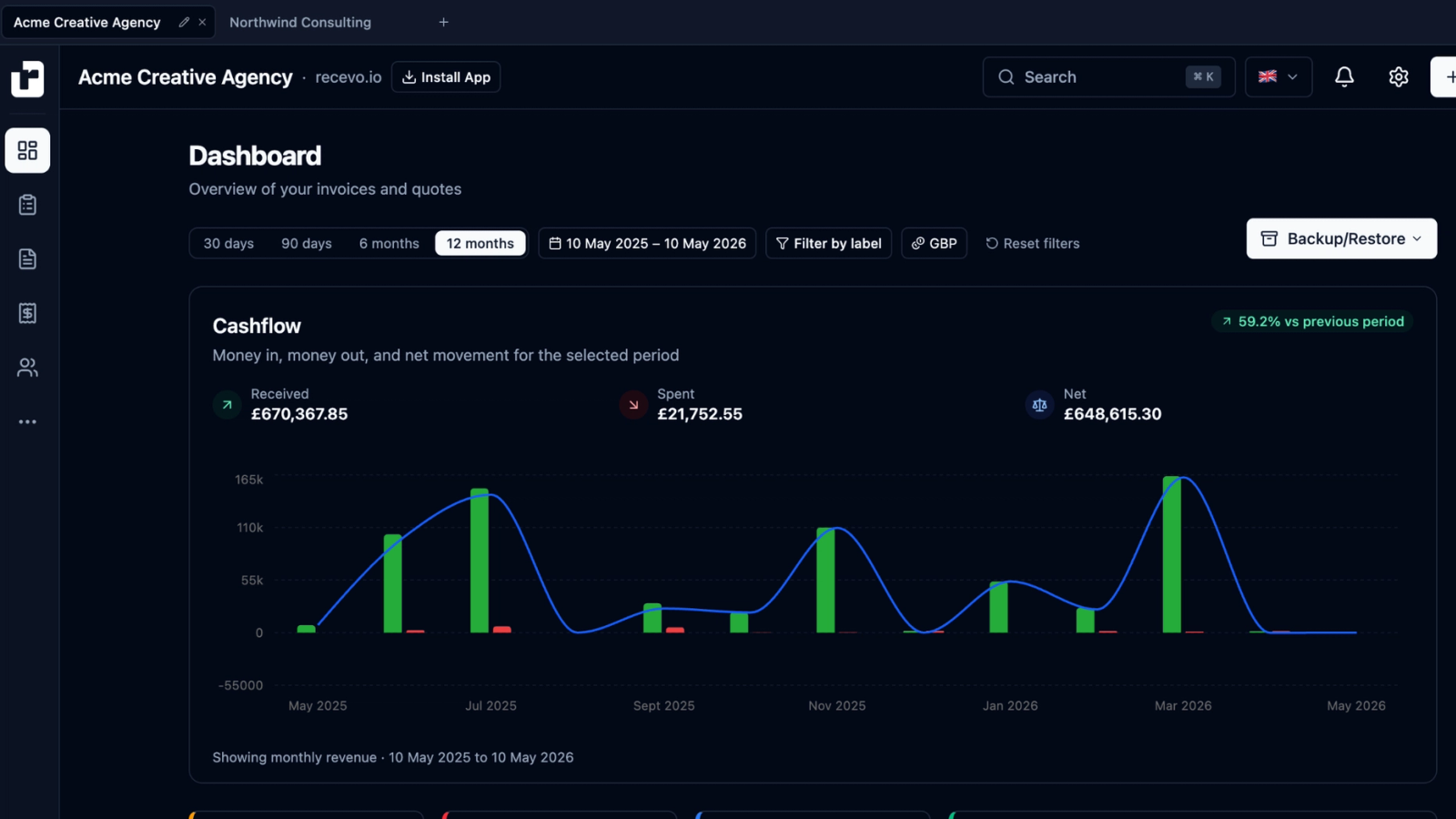
Freelancers do not need invoicing to be complicated.
You finish the work, create an invoice, send it to the client, track the payment, and keep a clean record for later.
That should be simple.
But many invoicing tools make the process heavier than it needs to be. Some require an account before you can download anything. Some start free, then lock useful features behind a subscription. Some are just basic templates with no record-keeping. Others are full accounting platforms with far more features than a freelancer actually needs.
If you are looking for a free invoice generator for freelancers, the best tool is not just the one that creates a PDF fastest.
It is the one that helps you invoice professionally, stay organised, avoid unnecessary subscriptions, and keep control of your business data.
That is what recevo.io is built for.
recevo.io is a free, no-signup invoice generator for independent workers. You can create invoices and quotes, export branded PDFs, track payments, record expenses, and prepare accountant-ready exports - all in your browser.
Why freelancers need a better invoice generator
Freelancers often work without a finance team, admin assistant, or accounts department.
That means invoicing usually happens between client work, project delivery, sales calls, emails, and everything else involved in running a small business.
A good invoice generator should save time, not create more admin.
It should help you:
create invoices quickly,
look professional to clients,
avoid calculation mistakes,
track what has and has not been paid,
reuse client and line item details,
send quotes before work begins,
keep records for tax season,
and export useful files when your accountant asks for them.
A simple invoice template can work for one or two invoices. But once you invoice regularly, you need something more structured.
What should freelancers look for in a free invoice generator?
Not all free invoice generators are the same.
Some are one-page forms. Some are lead magnets for paid software. Some are useful for a single PDF, but not much else.
Before choosing one, look for these features.
1. No signup required
A freelancer should not have to create an account just to send an invoice.
No-signup invoicing is useful when you want to move quickly. You can open the app, enter your details, create the invoice, and export the PDF without dealing with a login screen or trial signup.
recevo.io is designed around this workflow.
There is no email address required, no password, no onboarding wall, and no subscription prompt before you can create an invoice.
You can start invoicing straight away.
2. Free PDF export
A free invoice generator is not very useful if PDF export is locked behind a paid plan.
PDF is still the standard format for sending invoices because it is easy to email, upload, archive, and open on almost any device.
A good invoice generator should let you create a professional PDF without watermarks, surprise limits, or upgrade prompts.
With recevo.io, you can export professional invoice PDFs from the browser. You can also customise the look of your invoices with branding options such as templates, logo, accent colour, tagline, and footer text.
Your invoice should look like it came from a serious business, even if you are a team of one.
3. Professional invoice fields
A proper freelancer invoice needs more than a total and a name.
At minimum, your invoice should include your business details, client details, invoice number, issue date, due date, line items, quantities, rates, tax, discounts, total amount due, payment terms, and notes.
recevo.io gives you structured fields for the details freelancers usually need.
That means you are not manually formatting a document, fixing broken spreadsheet formulas, or copying old invoices and hoping nothing gets missed.
The app handles totals automatically, so you can focus on the work being billed rather than the maths.
4. Quotes and estimates
Many freelance jobs do not start with an invoice.
They start with a quote.
A client asks for a price. You define the scope, timeline, deliverables, and cost. The client accepts. Then the quote becomes the basis for the invoice.
A basic invoice generator often ignores that workflow.
recevo.io includes quotes and estimates alongside invoices. You can create a professional quote, add project details, include line items and tax, then convert the accepted quote into an invoice with one click.
For freelancers, this is a big time-saver. It avoids retyping the same information and helps keep the sales-to-payment process connected.
5. Payment tracking
Creating an invoice is only half the job.
You also need to know whether it has been paid.
A good invoice generator should help you track invoice status, record payments, and see what is still outstanding.
With recevo.io, you can mark invoices as paid, record payment details, track refunds, and review invoice status from your workspace.
That gives you a clearer picture of what money is expected, what has arrived, and what may need chasing.
6. Private browser-based data
Invoice data can be sensitive.
Your invoices may include client names, addresses, project descriptions, hourly rates, day rates, business revenue, payment terms, and other information you may not want stored in yet another SaaS database.
Many online invoice tools are cloud-based. That means your business records are stored in the provider’s systems.
recevo.io works differently.
Your workspace lives in your browser. There is no central recevo.io invoice database containing your business records. Sensitive local data is encrypted at rest, and shared invoice or quote links are encrypted before leaving your browser.
For privacy-conscious freelancers, that is one of the biggest reasons to choose recevo.io.
You can still use a modern invoice app, but your invoices stay under your control.
7. Offline support
Freelancers do not always work from a perfect desk setup with reliable Wi-Fi.
You might be travelling, working from a client site, using mobile data, or finishing admin somewhere with a poor connection.
recevo.io is a Progressive Web App. Once loaded, it can work offline.
That means you can create, edit, manage, and export invoices without needing a constant internet connection.
This is especially useful for freelancers who work on the move, consultants visiting clients, tradespeople invoicing on-site, or anyone who wants their invoice app to keep working when the internet does not.
8. Expense tracking
Freelancers need to understand more than what they billed.
They also need to know what they spent.
Software subscriptions, equipment, materials, travel, hosting, phone bills, insurance, subcontractors, and other business costs all affect your actual profit.
Many free invoice generators stop at invoices. recevo.io includes expense tracking too.
You can record expenses, attach receipts or supplier invoices, organise costs with categories, and review your numbers from the dashboard.
This does not make recevo.io a heavy accounting platform. It simply gives freelancers a clearer view of money in and money out.
9. Accountant-ready exports
At some point, you may need to hand records to an accountant or prepare for tax season.
If your invoices are in one folder, receipts are on your phone, and expense totals are in a spreadsheet somewhere else, that can become painful quickly.
recevo.io helps you keep cleaner records during the year.
You can export invoice PDFs, expense attachments, and CSV spreadsheets as part of an accountant-ready ZIP file. That makes it easier to share useful records without manually collecting everything at the last minute.
For freelancers, that can turn year-end admin from a scramble into a more manageable process.
10. No unnecessary accounting-suite bloat
Some freelancers need full accounting software.
If you need bank feeds, payroll, team access, automatic reconciliation, multi-user permissions, or deep compliance workflows, a full accounting platform may be the right choice.
But many freelancers do not need that much software.
They need a fast, private, professional way to create invoices and quotes, track payments, record expenses, and export records.
recevo.io is built for that middle ground.
It is more capable than a basic invoice template, but lighter than traditional accounting software.
Why recevo.io works well for freelancers
recevo.io is designed for independent workers who want invoicing without the overhead.
You can use it to:
create professional invoices,
send quotes and estimates,
convert quotes into invoices,
export branded PDFs,
record payments and refunds,
track expenses,
attach receipts,
review your live P&L,
export accountant-ready records,
work offline,
and keep your data in your browser.
There is no signup required. There is no subscription. There is no premium tier hiding the useful features.
It is built for freelancers, sole traders, consultants, creatives, developers, writers, tutors, photographers, tradespeople, coaches, side hustlers, and privacy-conscious professionals.
The honest trade-off: backups matter
recevo.io is browser-first by design.
That gives you privacy and control, but it also means you need to take backups seriously.
Because your workspace lives in your browser, there is no automatic cloud sync. If you clear your browser data, reset your device, or remove site data without a backup, your local workspace can be deleted.
recevo.io includes Backup & Restore so you can export your data and store it securely.
This is the trade-off of a local-first invoice app: fewer cloud dependencies, but more responsibility for your own files.
For many freelancers, that is a worthwhile exchange.
Free invoice generator vs invoice template
Some freelancers start with invoice templates in Word, Google Docs, Excel, or spreadsheets.
That can work at first, but templates become awkward as your business grows.
You may need to copy old files, update invoice numbers manually, check formulas, remember client details, track payment status somewhere else, and organise PDFs yourself.
A proper invoice generator gives you more structure.
recevo.io helps you create invoices faster, keep records together, reuse details, export PDFs, and track what happened after the invoice was sent.
It keeps the simplicity of a template, but adds the workflow freelancers need when invoicing becomes regular.
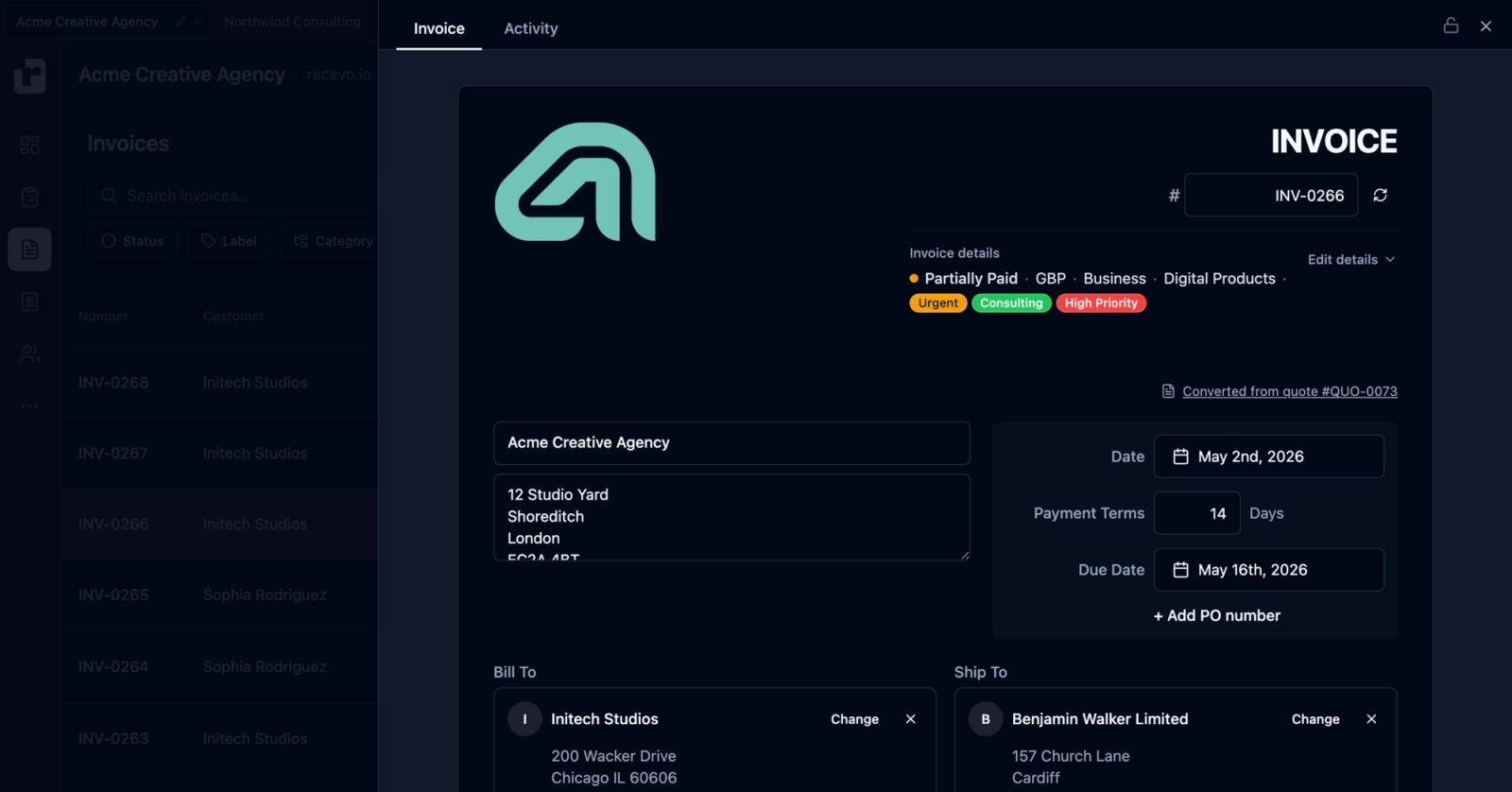
What makes a good freelancer invoice?
A good freelancer invoice should be clear, accurate, and easy to pay.
It should tell the client:
who the invoice is from,
who it is for,
what work was completed,
how much is due,
when payment is due,
how to pay,
and which invoice number to reference.
It should also look professional.
That does not mean it needs to be over-designed. It just needs to be clean, readable, consistent, and easy for the client to process.
recevo.io’s PDF templates are designed for that: polished invoices without needing a design tool.
Frequently asked questions
What is the best free invoice generator for freelancers?
The best free invoice generator for freelancers is one that lets you create professional invoices quickly, export PDFs, track payments, and keep records organised without forcing you into a subscription. recevo.io is built for this: no signup, free PDF export, quotes, expenses, offline support, and private browser-based data.
Can I create freelance invoices without signing up?
Yes. recevo.io lets you create invoices without creating an account. Open the app in your browser and start invoicing.
Can I download invoices as PDFs?
Yes. recevo.io lets you export professional invoice PDFs that you can send to clients, store, or archive.
Can I create quotes as a freelancer?
Yes. recevo.io includes quotes and estimates. You can create a quote before work begins, then convert it into an invoice when the client accepts.
Does recevo.io store my invoices in the cloud?
No. recevo.io is browser-first. Your workspace lives in your browser rather than a central recevo.io invoice database. Because of this, you should use Backup & Restore to protect your records.
Can I use recevo.io offline?
Yes. recevo.io is a Progressive Web App. Once loaded, it can work offline, so you can create and manage invoices without a constant internet connection.
Is recevo.io accounting software?
No. recevo.io is an invoicing tool for independent workers. It includes useful features such as expenses, P&L, and accountant exports, but it is not payroll software, a bank-feed reconciliation tool, or a multi-user accounting suite.
Start invoicing for free
Freelancers should not have to pay a monthly subscription just to send professional invoices.
With recevo.io, you can create invoices and quotes, export branded PDFs, track payments, record expenses, and prepare cleaner records for your accountant — all without creating an account.
No signup. No subscription. No invoice limits. Your invoices stay in your browser.
Create your first invoice here:
Unlimited invoices, quotes & expenses · Free forever
Send your next invoice from recevo.io, and every one after it, free
Create the invoice, download a branded PDF or share a secure read-only link, then record the payment when it lands. Free forever, no account needed.
Free forever · No account · No card · No watermark · Opens in a new tab
Unlike most free invoice tools:
- Unlimited invoices and quotes
- Branded PDFs with no watermark
- Works offline in your browser
- Your data never leaves your device
- Expenses and profit tracking included
- No account, no card, no premium tier

“I set up my branding once - now everything I send looks professional.”