
Chase Reminders: Follow Up on Invoices Without Giving Up Privacy
Chasing invoices is awkward, but forgetting to follow up can hurt cash flow. Chase Reminders in recevo.io spots invoices and quotes that need attention, then drafts the email for you to send yourself.
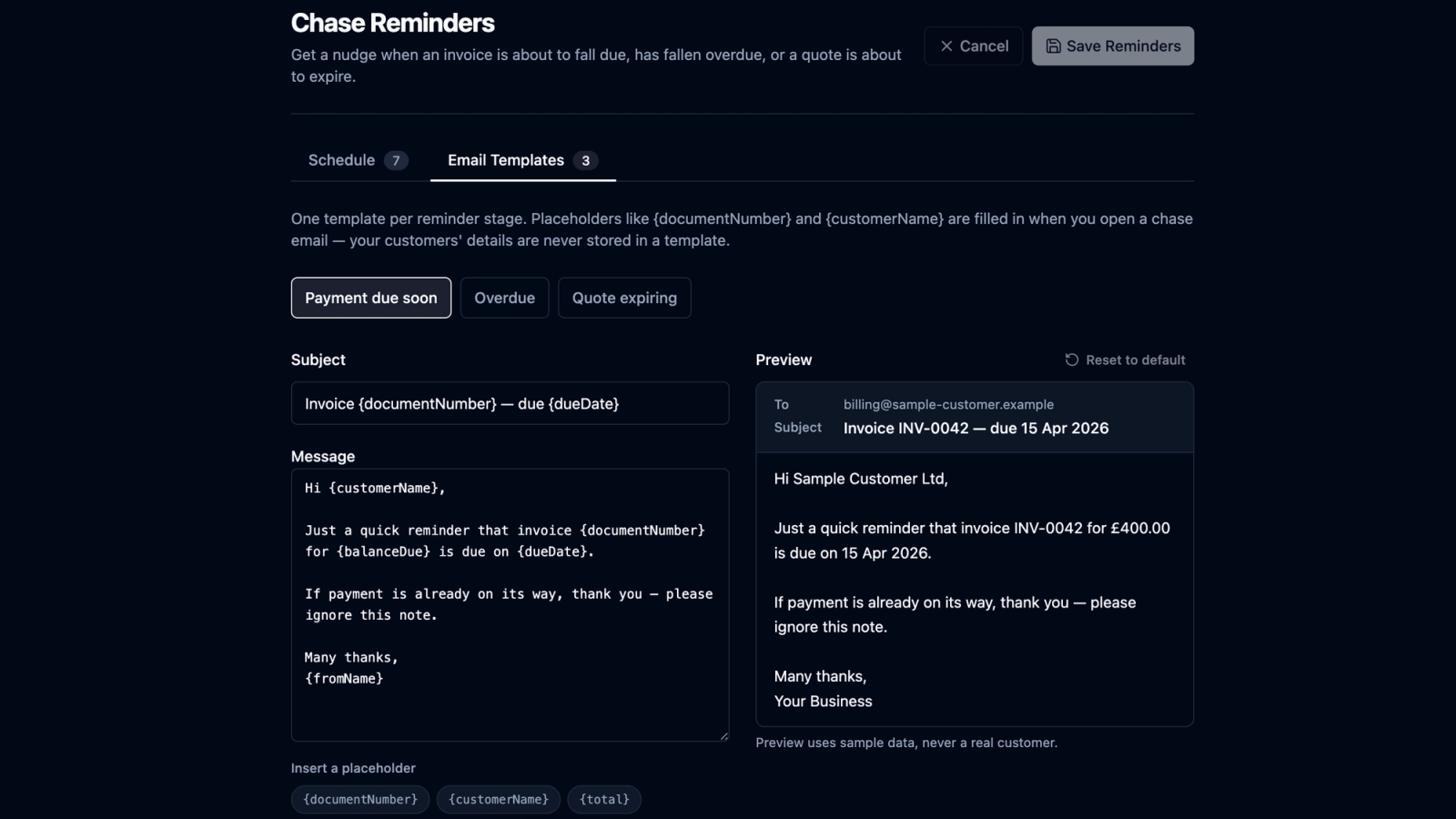
Chasing payment is one of the most awkward parts of freelancing.
The work is done.
The invoice has been sent.
The due date has passed.
Now you have to write the message nobody enjoys writing.
Most freelancers do not lose money because they forgot how to invoice.
They lose time, energy, and sometimes payment momentum because the follow-up slips.
That is why recevo.io now includes Chase Reminders: a new opt-in feature that helps you spot invoices and quotes that need attention, then gives you a finished follow-up email ready to send.
The important part is how it works.
recevo.io does not send emails for you. It does not run email sequences. It does not track opens, delivery, or replies. It does not contact your customers on your behalf.
Instead, Chase Reminders works entirely in your browser.
It checks your outstanding invoices and live quotes when you use the app, shows you when one has crossed a reminder threshold, and drafts the chase email for you.
You read it.
You choose whether to send it.
You send it from your own email address.
That design is deliberate.
A chasing feature built by a product that cannot send email
Many invoicing tools handle follow-up by sending reminder emails from their own servers.
That usually means the service holds customer details, invoice details, and email delivery logic on the server side.
recevo.io is different.
Your normal workspace lives in your browser, not in a central recevo.io invoice database. That is part of its privacy-first, no-signup design.
So Chase Reminders was built around the same principle.
The app can help you notice what needs attention.
The app can write the email.
But the email is still sent by you.
That makes the feature a better fit for freelancers and small studios who want help with follow-up, without handing the actual customer relationship to an automated dunning system.
How Chase Reminders works
Chase Reminders uses a schedule based on the date that matters.
For invoices, that date is the invoice due date.
For quotes, that date is the quote expiry date.
A reminder can be set a number of days before or after that date.
For invoices, the default reminder points are:
- 7 days before the due date
- 1 day before the due date
- 1 day after the due date
- 7 days after the due date
- 14 days after the due date
For quotes, the default reminder points are:
- 7 days before expiry
- 3 days before expiry
Quote reminders only happen before expiry. Once a quote has lapsed, there is nothing live to chase, so recevo.io does not allow quote reminders after the expiry date.
You can edit the schedule in Main Nav → Reminders.
Each workspace has its own reminder settings, so you can adjust the workflow to suit how you work.
One reminder per document
Chase Reminders is designed to avoid noise.
If you have been away for two weeks and an unpaid invoice has crossed several reminder thresholds, recevo.io does not show a pile of separate reminders for the same invoice.
It shows one reminder for that document, at the most urgent stage reached.
If you dismiss that reminder, you dismiss that stage. The invoice is not silenced forever. If the next threshold passes and the invoice still needs attention, it can appear again.
When a document stops needing a chase, the reminder resolves.
A paid invoice is not chased.
A voided invoice is not chased.
An accepted quote is not chased.
A document moved to the bin is not chased.
A locked invoice can still be chased, because locking freezes the paperwork. It does not mean the debt has gone away.
Three reminder stages
Chase Reminders has three stages.
Payment due soon is for an invoice approaching its due date. This is an informational nudge, not a hard chase.
Invoice overdue is for an invoice where the due date has passed and money is still outstanding.
Quote expiring is for a live quote that is approaching its expiry date, while there is still time to follow up.
Each stage has its own editable email template.
That means a gentle “payment due soon” message can sound different from an overdue invoice follow-up, and a quote expiry reminder can stay focused on whether the client wants to go ahead.
The email is written for you, but sent by you
When you open a Chase Reminder, recevo.io prepares a finished email.
It fills in the relevant document number, dates, amounts, balance due, customer name, and other details at the moment you open it.
You get:
- the customer email address
- a subject line
- a complete email body
- a button to open it in your mail app
- copy buttons for each field
Those copy buttons matter.
Many freelancers use webmail, shared inboxes, browser profiles, or email clients where a mailto: link may not behave the way they want.
So you can copy the address, subject, or body separately and paste them wherever you send email.
Once you have sent the message, you can mark it as sent in recevo.io. That writes an entry into that document’s activity history, so you can see what you chased and when.
Privacy is part of the design
Chase Reminders does not write the finished email into permanent reminder storage.
It also avoids placing customer names, email addresses, or postal addresses in the reminder notification itself.
A reminder stores the minimum needed to tell you what requires attention, such as the document number, dates, amount, currency, and stage.
The customer details are read and decrypted only when you open the email view.
That matters because recevo.io is built around a browser-first model. The feature is designed so the reminder can exist without quietly leaking customer details out of the encrypted document data.
In plain English: the notification tells you which document needs attention, but the customer details stay protected until you choose to open the composed email.
Templates in 12 languages
Chase Reminders ships with editable templates for each stage.
The templates support placeholders such as:
{documentNumber}{customerName}{total}{balanceDue}{currency}{issueDate}{dueDate}{validUntilDate}{daysOverdue}{fromName}
If you leave a default template alone, it follows your app language.
So if you switch recevo.io to German, the default wording follows. If you edit a template, it becomes yours and stays yours through language changes.
Chase Reminders is available across all 12 supported languages.
It works offline
Chase Reminders works in the browser and does not need a server to function.
That includes reminders, templates, email composition, and copying fields.
Because recevo.io does not send the email, there is no server-side email job waiting in the background.
You open the app, review what needs attention, and send the message yourself.
It ships switched off
Chase Reminders is opt-in.
Every workspace starts with the feature switched off, including existing workspaces.
That means nobody opens recevo.io after an update and suddenly finds their notification bell full of invoice reminders.
To enable it, go to:
Main Nav → Reminders
The default schedule and templates are already set up, so you can review everything before switching it on.
You can adjust the invoice schedule, quote schedule, and email wording to match how you prefer to follow up.
What Chase Reminders is not
Chase Reminders is not automatic email sending.
It is not an automated dunning system.
It does not send emails in the background.
It does not track whether a customer opened an email.
It does not track delivery.
It does not track replies.
It does not sync reminder activity to a server.
It does not chase customers for you.
It prompts you, writes the email, and lets you decide what happens next.
That is the point.
A calmer way to follow up
Chasing invoices will probably never be anyone’s favourite part of freelancing.
But it can be less awkward when the reminder appears at the right time and the email is already drafted.
Chase Reminders helps you keep an eye on outstanding invoices and expiring quotes without changing the private, browser-based model that makes recevo.io different.
You stay in control of the message.
Your customer details stay on your device.
No email is sent unless you send it.
To try Chase Reminders, open recevo.io and go to:
Main Nav > Reminders
The schedule and templates are already waiting.
Start here:
No signup. No subscription. No invoice limits. Just private, browser-based invoicing for independent workers.
Unlimited invoices, quotes & expenses · Free forever
Your next reminder is already written
Open recevo.io, add the invoice, and Chase Reminders drafts the polite follow-up when it falls due. No account, and nothing is sent without you.
Free forever · No account · No card · No watermark · Opens in a new tab
Unlike most free invoice tools:
- Unlimited invoices and quotes
- Branded PDFs with no watermark
- Works offline in your browser
- Your data never leaves your device
- Expenses and profit tracking included
- No account, no card, no premium tier

“Send a quote, convert it to an invoice in one click - tracking payments is so much easier.”