
Export an Accountant Pack with Invoice PDFs, Expenses, and CSV Files
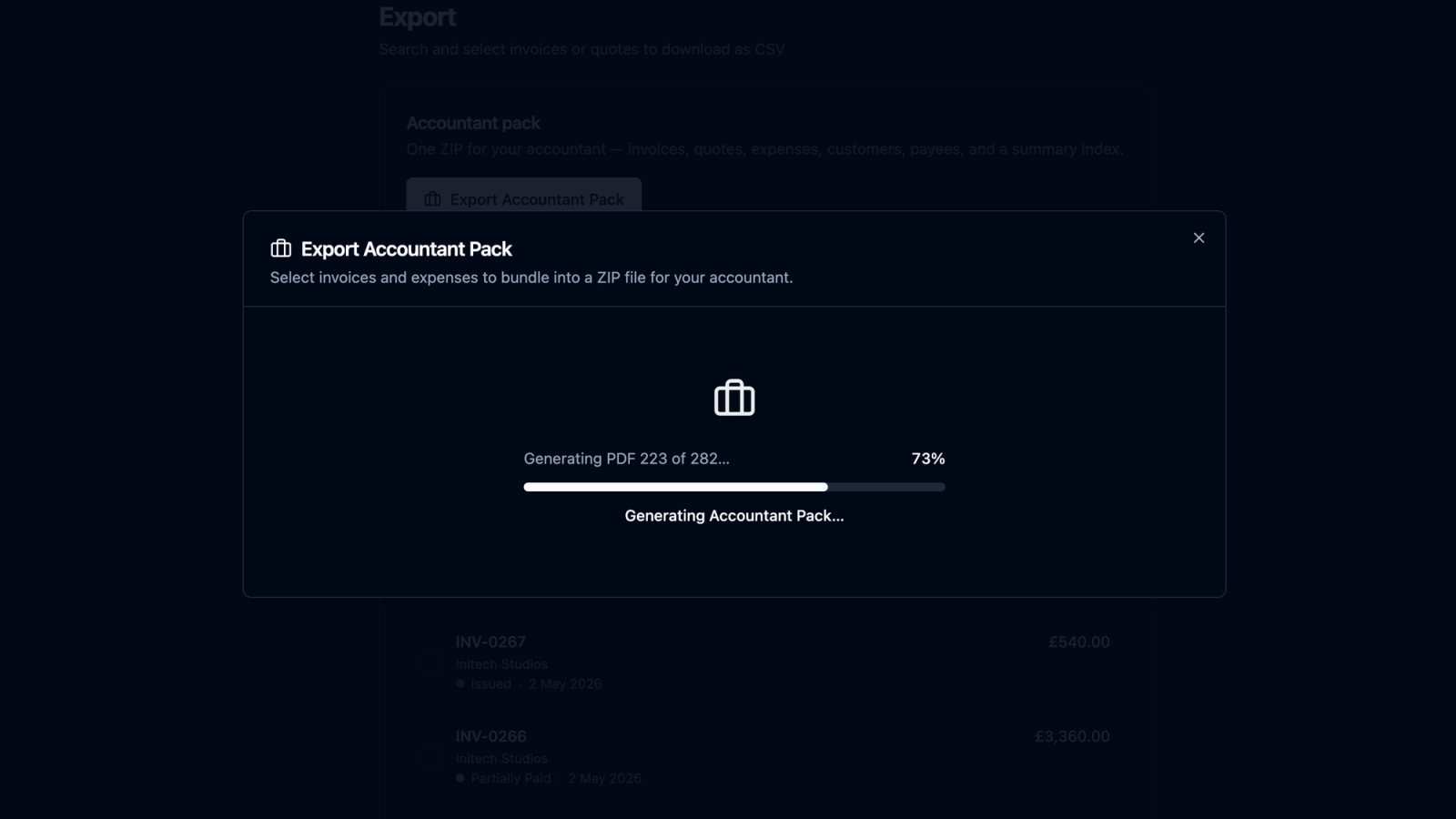
recevo.io’s Accountant Pack export helps freelancers, sole traders, and independent workers prepare cleaner records for year-end. Export selected invoice PDFs, expense attachments, and CSV spreadsheets of your invoices and expenses into a single ZIP file — ready to send to your accountant or keep for your own records.
Year-end admin is rarely difficult because of one missing invoice.
It is difficult because everything is scattered.
One invoice PDF is in your downloads folder. Another was emailed directly to a client. A receipt photo is on your phone. Expense totals live in a spreadsheet. A few payment records are buried in your notes. Then, when your accountant asks for everything, you have to reconstruct the year from fragments.
recevo.io is designed to make that handoff easier.
With the Accountant Pack export feature, you can generate a ZIP file that includes your selected invoice PDFs, expense attachments, and CSV spreadsheets of your invoices and expenses. Instead of sending a messy folder of separate files, you can export a cleaner package of records in one go.
It is built for freelancers, sole traders, consultants, creatives, tradespeople, side hustlers, and independent workers who want invoicing to stay simple - but still need organised records when it matters.
What is an Accountant Pack?
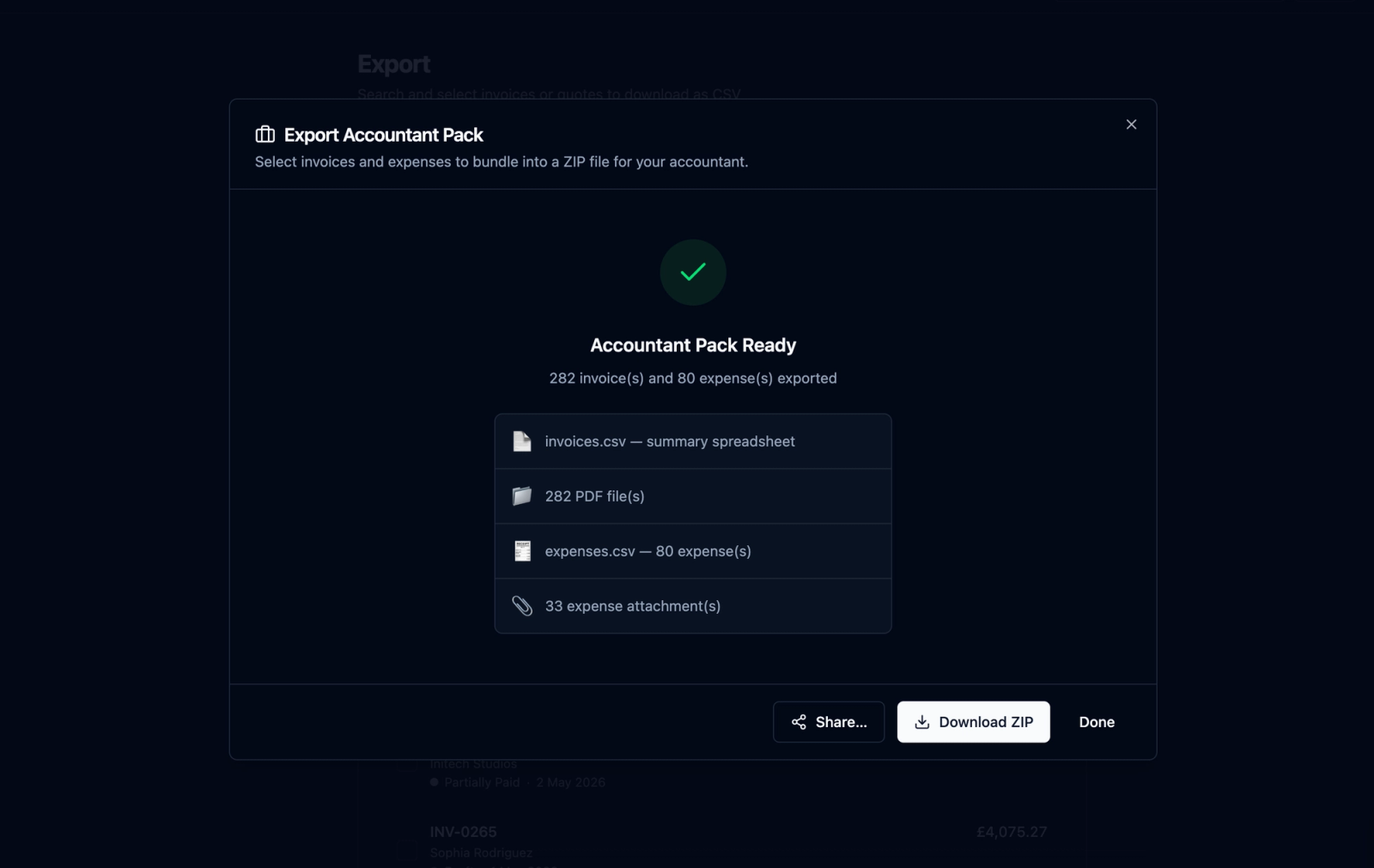
An Accountant Pack is a downloadable ZIP file containing the key records your accountant may need from your invoicing workspace.
In recevo.io, that can include:
Invoice PDFs
Professional PDF copies of your selected invoices, ready to review, archive, or share.
Expense attachments
Receipt images, supplier invoices, and other expense attachments linked to your recorded expenses.
Invoice CSV spreadsheet
A spreadsheet-friendly export of invoice data, including useful fields such as invoice numbers, dates, customers, statuses, currencies, totals, tax, discounts, and balances.
Expense CSV spreadsheet
A spreadsheet-friendly export of expense data, helping you review costs, categories, tax classifications, payees, dates, and amounts.
The goal is simple: give your accountant the files they need without manually collecting every PDF, receipt, and spreadsheet yourself.
Why invoice PDFs are not enough
A folder of invoice PDFs is useful, but it is not always enough.
PDFs are good for human review. They show the final document as it was sent to the client, including branding, line items, payment terms, and totals.
But accountants often need structured data too.
That is where CSV files help. A CSV spreadsheet makes it easier to sort, filter, total, analyse, import, or reconcile records. Instead of manually reading every invoice PDF, your accountant can work from a spreadsheet of invoice data and open the PDF only when they need the full document.
recevo.io’s Accountant Pack gives you both: readable invoice PDFs and structured CSV exports.
Expenses matter too
Many invoice tools focus only on money coming in.
But year-end records are not just about invoices. Your expenses matter as well.
If you are a freelancer or sole trader, your business costs might include software subscriptions, equipment, materials, travel, hosting, phone bills, stationery, contractor payments, insurance, or other regular outgoings.
recevo.io lets you record expenses alongside your invoices. You can attach receipts or supplier invoices, add categories, mark tax classifications, and keep those records connected to your wider business picture.
When it is time to export your Accountant Pack, those expense records become much easier to hand over.
Instead of sending your accountant invoice PDFs in one email, receipt photos in another, and a spreadsheet later, you can package the records together.
A cleaner handoff for your accountant
The Accountant Pack is designed around a simple idea: your accountant should not have to chase the basics.
A clear export can help them answer questions faster:
Which invoices were issued in the period?
Which invoices were paid?
What totals were charged?
What tax was applied?
What expenses were recorded?
Which receipts or supplier invoices support those expenses?
Which categories or classifications were used?
A clean ZIP file does not replace professional advice, and it does not turn recevo.io into full accounting software. But it can reduce the amount of back-and-forth needed to collect your records.
That saves time for you and gives your accountant a better starting point.
Useful for tax season, year-end, and project records
You do not have to wait until the end of the tax year to use an Accountant Pack.
It can be useful whenever you need a structured export of your business records.
For example, you might export a pack:
at the end of each month,
at the end of each quarter,
before a tax return,
when sending records to your accountant,
when archiving a completed financial year,
when reviewing a client project,
or when creating your own backup of invoice and expense documents.
For independent workers, regular exports can make admin feel less overwhelming. Instead of letting receipts and invoice records pile up for a year, you can create a habit of exporting clean packs at regular intervals.
Built into a no-signup invoicing app
The Accountant Pack is part of recevo.io’s wider invoicing workflow.
You do not need to create an account to use recevo.io. You do not need to upload your invoice data to a central cloud database. Your workspace lives in your browser, and the app is designed around private, no-signup invoicing for independent workers.
That matters because invoice and expense records can contain sensitive business data.
Client names, addresses, invoice totals, line items, supplier details, receipts, and notes all say something about your business. recevo.io’s browser-first model is designed to keep that data under your control.
The Accountant Pack fits that model: your records are prepared from your local workspace and exported into a file you control.
What the ZIP file gives you
A good export is not just about downloading data. It is about downloading it in a form that is actually useful.
recevo.io’s Accountant Pack is designed to be practical.
The invoice PDFs are there for review and evidence.
The expense attachments are there to support recorded costs.
The CSV spreadsheets are there for sorting, filtering, calculations, and accountant workflows.
The ZIP file keeps everything together, so you can store it, send it, or archive it without losing track of individual files.
For many freelancers and sole traders, that is much easier than manually building a folder structure at the end of the year.
Why CSV export is important
CSV files are simple, portable, and widely supported.
They can be opened in spreadsheet tools, imported into other systems, reviewed by accountants, and stored as long-term records.
That makes CSV export especially useful for independent workers who do not want to be locked into one platform.
With recevo.io, your data is not trapped behind a dashboard. You can export useful spreadsheets of your invoices and expenses, then use them outside the app.
That is important for year-end admin, but it is also important for ownership. Your records should remain useful even outside the tool that created them.
Better records without heavier software
Many freelancers start with a basic invoice generator because they only need to send a PDF.
That works for a while.
But as soon as you have multiple clients, repeat invoices, expenses, receipts, tax categories, and accountant requests, a basic invoice generator starts to feel thin.
The usual next step is a full accounting platform. For some businesses, that is the right move. But for many independent workers, it is more than they need.
recevo.io sits in the middle.
It gives you more structure than a simple invoice template, without forcing you into heavy accounting software. You can create invoices and quotes, track payments, record expenses, attach receipts, review your live P&L, and export an accountant-ready pack when needed.
It is still an invoicing tool first. The extra features are there to help you stay organised.
Designed for freelancers and sole traders
The Accountant Pack is especially useful if you work independently.
Freelancers and sole traders often do not have finance teams. They do not have someone else collecting receipts, matching records, exporting spreadsheets, and preparing folders for the accountant.
They have to do it themselves.
recevo.io helps by keeping invoice and expense records in one workspace, then letting you export a package when it is time to hand things over.
That means less searching, less copying, less renaming, and less last-minute admin.
Keep your records under your control
recevo.io is browser-first by design.
That gives you more control, but it also means you should treat your own exports and backups seriously.
The Accountant Pack is useful for sharing records with your accountant, but it should not be your only backup strategy. You should also use Backup & Restore and store important files securely.
If you clear your browser data without a backup, your local workspace can be removed. That is the trade-off of a local-first tool: less cloud dependency, but more responsibility for your own files.
For privacy-conscious independent workers, that trade-off can be worth it.
A simple workflow for year-end
A cleaner year-end workflow might look like this:
Create invoices in recevo.io as you work.
Record payments when clients pay.
Add expenses as they happen.
Attach receipts or supplier invoices to expense records.
Use categories and tax classifications to keep records clearer.
Review your dashboard during the year.
When it is time to hand things over, export an Accountant Pack.
Send the ZIP file to your accountant or store it securely with your year-end records.
That is much easier than trying to rebuild your business history from emails, screenshots, spreadsheets, and download folders.
Who is the Accountant Pack for?
The Accountant Pack is useful for anyone who invoices independently and needs cleaner records.
It is a good fit for freelancers, sole traders, consultants, designers, developers, writers, photographers, tutors, tradespeople, coaches, side hustlers, and privacy-conscious professionals.
It is especially useful if you want to keep invoicing simple during the year, but still have a structured export when your accountant asks for records.
Start organising your invoice and expense records
recevo.io is free, no-signup invoicing for independent workers.
You can create invoices and quotes, export branded PDFs, track expenses, attach receipts, review your live P&L, and generate an Accountant Pack when it is time to hand records over.
No account. No subscription. No invoice limits. Just practical invoicing and cleaner exports for freelancers and sole traders.
Create your first invoice here:
Unlimited invoices, quotes & expenses · Free forever
Keep every expense next to the invoice it belongs to
Track one-off and recurring costs, attach receipts, and export an Accountant Pack when tax time comes. Free forever, no account needed.
Free forever · No account · No card · No watermark · Opens in a new tab
Unlike most free invoice tools:
- Unlimited invoices and quotes
- Branded PDFs with no watermark
- Works offline in your browser
- Your data never leaves your device
- Expenses and profit tracking included
- No account, no card, no premium tier

“I log every expense and see my net profit update in real time.”