
Why You Should Back Up Your recevo.io Data Regularly
recevo.io keeps your invoices, quotes, expenses, and records in your browser so you stay in control. That privacy-first model makes regular backups essential. Learn why browser data can be cleared, how backups protect your work, and why you should export your data often.
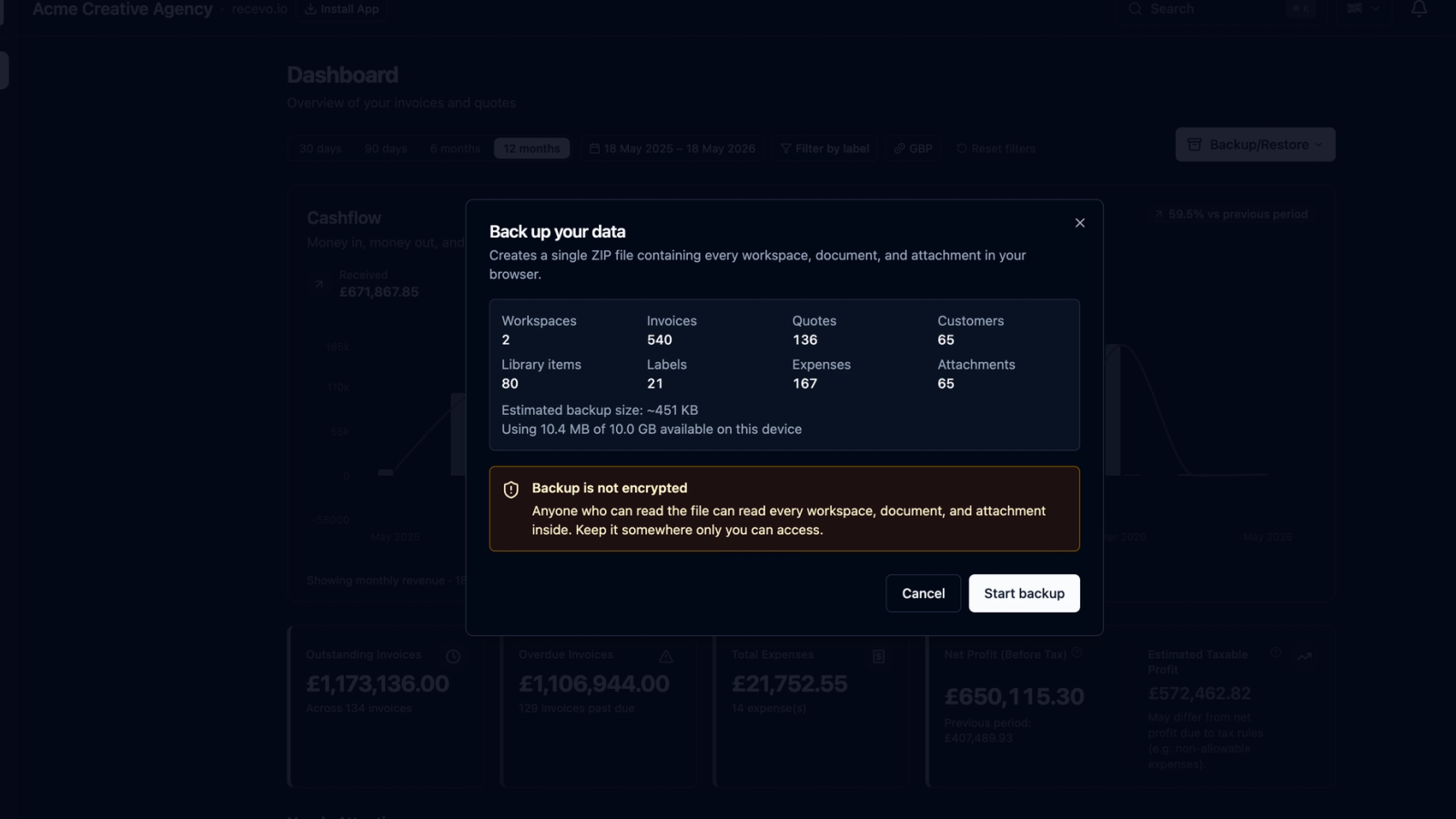
One of the best things about recevo.io is that your business data stays close to you.
You do not need to create an account. You do not need to upload your invoices into a central cloud database. You do not need to hand over your customer records just to create a professional invoice.
recevo.io is designed differently.
Your invoices, quotes, expenses, customers, settings, and related records live in your browser. That browser-first model is what makes recevo.io private, fast, no-signup, and easy to start using.
But it also means one habit matters more than anything else:
Back up your data regularly.
A backup is your safety net. It gives you a copy of your recevo.io workspace that you control, store, and can restore later if needed.
This guide explains why backups matter, when to create them, and how to think about protecting your records.
Your data lives in your browser
recevo.io is a browser-based invoicing app.
That means your workspace is stored locally in your browser rather than in a recevo.io cloud account.
This is a deliberate privacy and ownership choice. It means recevo.io does not keep a central database of your invoices, quotes, expenses, customers, or receipt records.
For many freelancers, sole traders, consultants, tradespeople, creatives, and privacy-conscious professionals, that is a major benefit.
Your business records can include sensitive information: customer names, addresses, project details, rates, invoice totals, payment notes, supplier information, expenses, and receipts.
Keeping that data in your browser gives you more control and reduces dependence on a hosted account.
But local storage also comes with responsibility.
If the browser data is removed, the local recevo.io workspace can be removed too.
That is why backups are essential.
Browser data can be cleared
Most people do not think about browser storage until something goes wrong.
But browser data can be cleared in several ways.
You might manually clear site data while troubleshooting.
You might clear cookies and storage to free up space.
A browser update, device reset, profile change, privacy tool, system cleaner, or browser setting could remove local data.
You might switch browsers or devices and expect your data to appear there automatically.
You might uninstall a browser, remove a profile, use private browsing, or reset your phone or laptop.
In any of these situations, locally stored app data can be lost.
Because recevo.io is intentionally browser-first and no-signup, there is no central recevo.io account where your workspace can simply be recovered from the cloud.
Your backup is what protects you.
Backups are part of using a local-first app well
Backing up is not a sign that something is wrong.
It is simply part of using a privacy-first, browser-based app responsibly.
Think of it like saving important documents to an external drive, exporting your photos, or keeping copies of tax records.
The more important the data, the more important the backup habit.
In recevo.io, your workspace can contain invoices, quotes, expense records, receipt attachments, customers, payees, categories, tax classifications, payment records, and settings.
Those records may matter for your business, your clients, your accountant, and your own peace of mind.
A regular backup means you are not relying on a single browser profile as the only copy of your business records.
The positive side of backups
Backups are not just about preventing loss.
They also give you flexibility.
A recevo.io backup can help you move records between devices, keep a point-in-time archive, store a year-end copy, protect records before changing browser settings, and keep a secure copy alongside other business documents.
If you are preparing records for your accountant, backups can also sit alongside your Accountant Pack exports.
A good backup habit gives you confidence.
You can use recevo.io’s local-first model while still keeping your important records protected.
When should you back up recevo.io?
The safest answer is: often.
The right rhythm depends on how much you use the app and how important your records are.
A good rule is to back up whenever losing recent changes would be frustrating or costly.
That might mean backing up:
After creating important invoices
If you have just created or sent key invoices, export a backup.
After adding expenses or receipts
If you have recorded a batch of expenses or attached receipts, back up the workspace.
Before clearing browser data
Never clear cookies, site data, cache, browser storage, or app data without exporting a backup first.
Before changing browser, device, or profile
If you are moving to a new laptop, phone, browser, or user profile, create a backup first.
Before uninstalling or resetting anything
If you are resetting your device, reinstalling your browser, or changing privacy tools, back up first.
At the end of each week or month
A regular weekly or monthly rhythm is a simple way to stay protected.
At the end of each quarter
If you send records to an accountant quarterly, create a backup at the same time.
At year-end
Export and store a year-end backup with your business records.
The more frequently you invoice, record expenses, or update records, the more frequently you should back up.
Back up before you clear anything
This is the most important practical rule.
Before clearing browser data, clearing site data, deleting cookies, resetting storage, uninstalling a browser, removing a browser profile, or using any cleanup tool, export a recevo.io backup.
Browser cleanup tools can be useful, but they can also remove the local storage that browser-based apps depend on.
Because recevo.io stores your workspace in your browser, clearing that storage can remove your recevo.io data.
A backup gives you something to restore from if that happens.
Backups help with device changes
Because recevo.io does not use a login account or automatic cloud sync, your workspace does not automatically follow you to a new device.
If you open recevo.io on a different browser, phone, laptop, or tablet, you may see a fresh workspace.
That is expected.
Your data is local to the browser where it was created.
To move your workspace, use Backup & Restore.
Export a backup from the browser that contains your data, store it safely, then restore it into the new browser or device.
This keeps the model simple and private while still giving you portability.
Store backups somewhere safe
A backup is only useful if you can find it later.
After exporting a backup, store it somewhere secure and sensible.
You might keep copies in encrypted cloud storage, an external drive, a secure business records folder, or another location you trust.
Because backups can contain business data, treat them carefully.
They may include invoices, customer details, expenses, supplier records, amounts, notes, and other information you would not want to lose or expose.
Use secure storage, sensible file names, and a routine you can actually maintain.
For example, you might name files by date:
recevo-backup-2026-05-18.json
or by period:
recevo-backup-2026-q2.json
Simple naming makes it easier to find the right backup later.
Backups and Accountant Packs are different
recevo.io includes export features that help with accountant handoff.
For example, an Accountant Pack can include invoice PDFs, expense attachments, and CSV spreadsheets for review.
That is useful for tax season, quarterly record preparation, and sending organised records to an accountant.
But an Accountant Pack is not the same as a full workspace backup.
An Accountant Pack is designed for sharing records.
A backup is designed to help you restore your recevo.io workspace.
You should use both where appropriate.
Export Accountant Packs when you need to send records to your accountant.
Export backups when you want to protect or move your recevo.io data.
recevo.io cannot recover data you have not backed up
This is important.
Because recevo.io does not store your workspace in a central cloud account, recevo.io cannot recover your local browser data if it is cleared, deleted, corrupted, overwritten, or lost.
If your browser data is removed and you do not have a backup, your recevo.io workspace may be permanently lost.
recevo.io is not responsible for data loss under any circumstances.
You are responsible for exporting backups, storing them securely, and making sure you can restore from them if needed.
That may sound serious, but it is also what makes the privacy model possible.
recevo.io gives you control of your records. Backups are how you protect that control.
A simple backup habit
The easiest backup system is the one you actually follow.
Here is a simple routine:
1. Create or update your records
Use recevo.io for invoices, quotes, expenses, receipts, customers, and related records.
2. Export a backup regularly
Choose a rhythm that fits your business: weekly, monthly, quarterly, or after important changes.
3. Store the backup securely
Keep it somewhere safe, organised, and separate from the browser itself.
4. Export before risky actions
Always back up before clearing browser data, resetting a device, switching browsers, or uninstalling anything.
5. Keep older copies when sensible
Do not always overwrite the same file. Keeping dated backups gives you more recovery options.
This routine takes a small amount of time, but it can protect a lot of work.
Why recevo.io uses this model
Many invoicing apps store your data in their own cloud systems.
That can be convenient, especially for multi-device sync and team access.
But it also means your invoices, customers, revenue, expenses, and business records live in someone else’s database.
recevo.io takes a different approach.
It is built for independent workers who want no-signup invoicing, local browser-based storage, offline support, and more control over their data.
That model is especially useful for freelancers and sole traders who do not need team accounts, payroll, bank feeds, or a heavy accounting platform.
The trade-off is simple:
You get more privacy and local ownership.
You also need to back up your own data.
Friendly reminder: back up today
If you already use recevo.io, take a moment to export a backup today.
Even if you only have a few invoices, it is worth building the habit early.
The best time to create a backup is before you need one.
A regular backup habit means you can enjoy the benefits of private, no-signup invoicing without relying on your browser as the only copy of your records.
Frequently asked questions
Why do I need to back up recevo.io?
recevo.io stores your workspace in your browser rather than a central cloud account. If browser data is cleared or lost, your local workspace can be lost too. Backups help protect your records.
Does recevo.io automatically sync my data to the cloud?
No. recevo.io is browser-first and does not use automatic cloud sync. Your data lives locally in your browser unless you export a backup or other files yourself.
Can recevo.io recover my data if I clear browser data?
No. recevo.io cannot recover data that was stored only in your browser and has been cleared or lost. You need a backup to restore your workspace.
Is recevo.io responsible if I lose data?
No. recevo.io is not responsible for data loss under any circumstances. Users are responsible for exporting backups, storing them securely, and protecting their own records.
When should I back up?
Back up regularly and before any action that could affect browser storage. This includes clearing browser data, changing devices, switching browsers, resetting a device, uninstalling a browser, or using cleanup tools.
Where should I store my backup?
Store backups somewhere secure and separate from your browser, such as encrypted cloud storage, an external drive, or a secure business records folder. Backups can contain sensitive business data, so protect them carefully.
Is an Accountant Pack the same as a backup?
No. An Accountant Pack is designed for accountant handoff and can include invoice PDFs, expense attachments, and CSV files. A backup is designed to restore your recevo.io workspace. Use both where appropriate.
Can I move recevo.io to another device?
Yes. Export a backup from the browser that contains your workspace, then restore it on the new device or browser. Because there is no automatic cloud sync, Backup & Restore is the way to move your data.
Keep your records protected
recevo.io gives independent workers a private, no-signup way to create invoices, quotes, expenses, and business records in the browser.
That local-first model is powerful, but backups are essential.
Export backups regularly. Store them securely. Back up before clearing browser data or changing devices.
Your records matter. Protect them.
Open recevo.io here:
Unlimited invoices, quotes & expenses · Free forever
Private invoicing, free forever
No account, no central database, no ads. Open the app and start invoicing with your data under your control.
Free forever · No account · No card · Nothing uploaded · Opens in a new tab
Unlike most free invoice tools:
- Unlimited invoices and quotes
- Branded PDFs with no watermark
- Works offline in your browser
- Your data never leaves your device
- Expenses and profit tracking included
- No account, no card, no premium tier

“My data isn't sitting in some vendor's database, and I can share secure read-only links.”