
What Should a Freelance Invoice Include?
A clear freelance invoice helps clients understand what they owe, when to pay, and how to pay. Here’s what to include so your invoices look professional and are easier to track.
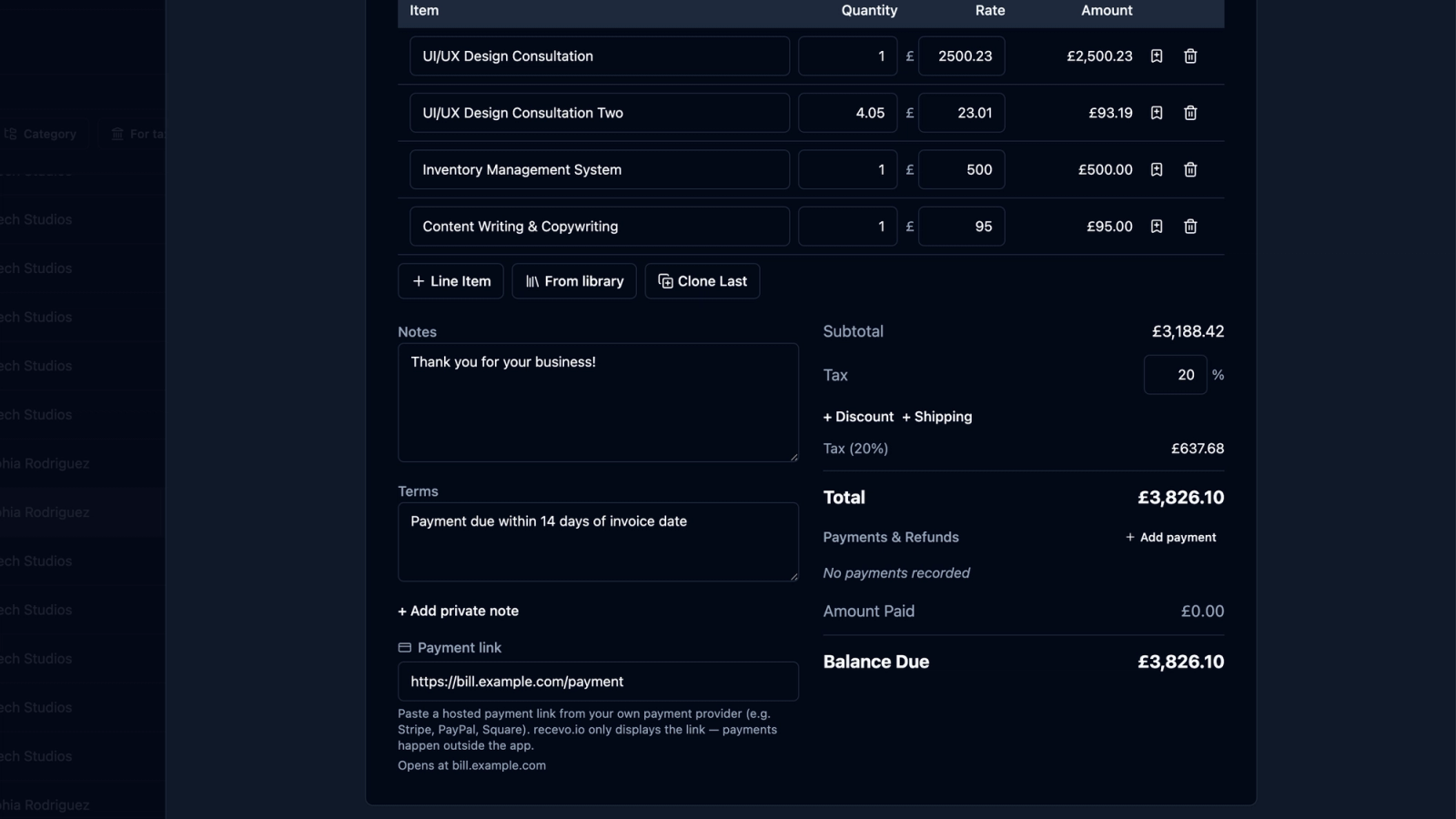
A good freelance invoice does more than ask for payment.
It tells the client what work was done, how much is due, when payment is expected, and how they should pay. It also gives you a clear record to track income, follow up on unpaid invoices, and prepare cleaner records later.
For freelancers, sole traders, consultants, tradespeople, creatives, and independent workers, invoices are part of the client experience.
A clear invoice feels professional.
A confusing invoice creates friction.
In this guide, we’ll walk through what a freelance invoice should include, which details are optional, common mistakes to avoid, and how recevo.io can help you create professional invoices without signing up for another account.
Why a clear freelance invoice matters
When you send an invoice, your client should not have to guess what it relates to.
They should be able to answer these questions quickly:
- Who sent the invoice?
- Who is being billed?
- What work, product, or service is being charged for?
- How much is due?
- When is payment due?
- How should payment be made?
- What invoice number should they use as a reference?
The easier your invoice is to process, the easier it is for the client to pay it.
That matters even more if your client has a finance team, approval process, purchase order system, or multiple suppliers.
Good invoice structure also helps you. It makes it easier to search, export, track payments, prepare records, and hand over information to your accountant.
This article is general guidance, not tax or legal advice. If you are unsure what your invoices must include in your country or situation, check official guidance or speak to your accountant.
1. Your business or trading details
Your invoice should clearly show who it is from.
Include your name, business name, or trading name. If you use a business address, include that too. You may also want to include your email address, phone number, website, or other contact details.
For freelancers and sole traders, this section helps the client identify you as the supplier.
It also gives them the information they need for their own records.
Depending on where you are based and how your business is set up, you may need to include additional details. Check the rules that apply to your business if you are unsure.
2. Your client’s details
Your invoice should also show who it is for.
At a minimum, include the client’s name or business name. If you have their billing address, include that too.
For larger clients, the billing details may be different from your day-to-day contact. For example, you may work with a project manager, but the invoice needs to go to a finance department or legal entity.
Keeping client details clear reduces the chance of payment delays.
It also helps you later when searching or exporting invoice records.
3. A unique invoice number
Every invoice should have a unique invoice number.
This is one of the most important parts of an invoice because it gives both you and the client a clear reference.
For example:
- INV-0001
- INV-0002
- INV-0003
A simple sequential system is often enough for freelancers. Some people include the year, such as:
- 2026-0001
- 2026-0002
The exact format matters less than consistency.
Avoid reusing invoice numbers. If a client asks about invoice INV-0042, there should only be one invoice with that number.
A clear invoice number helps with payment references, client questions, accountant handoff, and your own record keeping.
4. The invoice date
The invoice date shows when the invoice was issued.
This matters because it creates the starting point for payment terms.
For example, if your terms are “payment due within 14 days”, the invoice date helps calculate the due date.
It also helps you organise records by period, search historic invoices, and understand when income was billed.
5. The payment due date
Do not leave the client guessing when to pay.
Include a clear payment due date.
For example:
- Due on 30 June 2026
- Payment due within 14 days
- Payment due on receipt
A specific date is often easier to act on than a vague phrase. “Due on 30 June 2026” is clearer than “Net 14” for many clients.
The due date also helps you track overdue invoices and follow up politely when payment is late.
6. A description of the work
Your invoice should explain what the client is paying for.
This could be a service, product, project, session, milestone, retainer, day rate, hourly work, or a combination of line items.
Try to be specific enough that the client recognises the work immediately.
For example, instead of:
“Design work”
you could write:
“Landing page design and responsive layout — June 2026”
Instead of:
“Consulting”
you could write:
“Strategy consultation, workshop preparation, and follow-up notes”
Clear descriptions reduce questions and make the invoice easier to approve.
7. Line items, quantities, and rates
Line items break the invoice into understandable parts.
A typical line item includes:
- description
- quantity
- unit rate
- total
For example:
- 2 days web development at £450 per day
- 5 hours consultancy at £90 per hour
- 1 project discovery workshop at £750
Line items are useful because they show how the total was calculated.
This is especially important if the invoice includes multiple services, expenses, products, or milestones.
A clear breakdown gives the client confidence that the total is correct.
8. Tax, if relevant
If tax applies to your invoice, show it clearly.
For example, you may need to show a tax rate, tax label, tax amount, and total including tax.
The exact requirements depend on your country, tax status, and business situation, so check official guidance or speak to your accountant if you are unsure.
If tax does not apply, do not invent it. Keep the invoice simple and accurate.
recevo.io supports tax fields in the invoice workflow, but it does not give tax advice or file tax returns.
9. Discounts, shipping, or extra charges
If you add a discount, shipping charge, or other adjustment, make it visible.
Clients should be able to understand the journey from subtotal to final total.
For example:
- subtotal
- discount
- tax
- shipping
- total due
This is clearer than hiding adjustments inside line item descriptions.
It also helps you keep cleaner records later.
10. The total amount due
The total amount due should be easy to find.
Do not make the client hunt for it.
A good invoice layout makes the final total visually clear, usually near the bottom of the invoice summary.
If the invoice is in a specific currency, show that clearly too.
This is especially important if you work with international clients or use multiple currencies.
11. Payment instructions
Your invoice should tell the client how to pay.
Payment instructions might include:
- bank transfer details
- payment reference
- preferred payment method
- payment link
- cheque details
- PayPal or other payment information
- notes about international payments
If you want the client to use the invoice number as the payment reference, say so.
For example:
“Please use invoice number INV-0042 as the payment reference.”
Clear payment instructions reduce back-and-forth and help payments match the right invoice.
12. Payment terms
Payment terms explain the rules around payment.
They might include:
- when payment is due
- accepted payment methods
- late payment terms
- deposit terms
- staged payment details
- refund or cancellation notes
- project-specific terms
For many freelancers, simple terms are enough.
For example:
“Payment due within 14 days by bank transfer.”
The important thing is that the client understands what is expected.
If you need formal terms for your business, speak to a professional adviser rather than relying on a generic template.
13. Notes or a short message
Many invoices include a short notes section.
This can be practical, friendly, or both.
For example:
“Thank you for your business.”
or:
“Please contact me if you need this invoice reissued with different billing details.”
Keep notes concise. The invoice should stay easy to read.
14. Optional purchase order or project reference
Some clients need a purchase order number or project reference on the invoice.
If your client gives you one, include it clearly.
Missing purchase order numbers can delay payment, especially with larger businesses.
If you often work with clients that use purchase orders, make this part of your invoice checklist.
15. Status and payment records
The PDF you send to the client is only one part of invoicing.
You also need to know what happened afterwards.
Was the invoice sent? Paid? Part-paid? Refunded? Overdue?
A spreadsheet or file folder can track this manually, but it is easy to forget.
recevo.io lets you track invoice statuses and record payments and refunds against invoices. That means the invoice record stays useful after the PDF has been sent.
For freelancers, this can be just as important as the invoice itself.
16. A professional PDF
Most clients expect invoices as PDFs.
PDFs are easy to email, upload, print, save, and forward to finance teams.
A professional invoice PDF should look clean, readable, and consistent. It should not feel like a fragile spreadsheet export where the columns, page breaks, or logo might shift unexpectedly.
recevo.io lets you create professional invoice PDFs in your browser, using built-in templates and branding options such as logo and accent colour.
That means you can send polished invoices without designing your own document layout from scratch.
Common freelance invoice mistakes to avoid
A good invoice does not need to be complicated, but a few mistakes can slow payment down.
Missing or unclear due date
If the invoice does not say when payment is due, the client may not prioritise it.
Always include a clear due date or payment term.
Duplicate invoice numbers
Reusing invoice numbers creates confusion.
Each invoice should have its own unique number.
Vague work descriptions
Descriptions like “work completed” or “services” can create questions.
Use enough detail that the client understands what the invoice relates to.
Missing payment instructions
If the client does not know how to pay, they may need to ask.
Include payment method, details, and reference instructions.
Sending editable files instead of PDFs
Editable documents can be changed accidentally and may display differently on different devices.
A PDF gives both you and the client a fixed version of the invoice.
Forgetting to track payment
Sending the invoice is not the end of the process.
You still need to know whether it was paid, when it was paid, and whether anything remains outstanding.
How recevo.io helps you create freelance invoices
recevo.io is private, no-signup invoicing for independent workers.
It helps you create professional invoices in your browser without creating an account, email address, password, trial, or subscription.
You can create invoices with:
- customer details
- invoice numbers
- issue dates and due dates
- line items
- tax
- discounts
- shipping
- notes
- payment terms
- PDF export
- encrypted sharing
- payment and refund tracking
- private notes
- locking
- cloning
- audit history
It is invoicing-first, with useful depth around quotes, expenses, live P&L visibility, categories, tax classification, and accountant-ready exports.
It is not accounting software, tax filing software, payroll software, or a replacement for your accountant.
The goal is simpler: help independent workers create, send, and track invoices without unnecessary overhead.
Why no signup matters
Many invoicing tools make you create an account before you can send even one invoice.
recevo.io does not.
You can open the app and start invoicing — no account required.
That makes it useful when you want to create an invoice quickly without setting up another subscription or handing over your normal invoicing workspace to a central cloud invoice database.
Your normal recevo.io workspace lives in your browser. This is a deliberate privacy and ownership choice.
There is an important trade-off: if browser data is cleared, your local workspace can be lost unless you have a backup.
recevo.io supports manual JSON Backup & Restore. Backup files are plain JSON for portability and transparency, so they may contain sensitive business data and should be stored securely.
Optional Encrypted Cloud Backup can also provide an off-device safety net. It is opt-in, off by default, and is not real-time cloud sync.
A simple freelance invoice checklist
Before sending an invoice, check that it includes:
- your business or trading details
- your client’s billing details
- a unique invoice number
- invoice date
- payment due date
- clear line item descriptions
- quantities and rates
- tax details, if relevant
- discounts or extra charges, if relevant
- total amount due
- currency
- payment instructions
- payment terms
- purchase order or project reference, if needed
- a professional PDF copy for the client
- a way for you to track payment status
If those details are clear, your invoice is much easier for the client to process.
Frequently asked questions
What should a freelance invoice include?
A freelance invoice should usually include your details, the client’s details, a unique invoice number, invoice date, due date, line items, quantities, rates, tax if relevant, total amount due, payment instructions, and payment terms.
Depending on your business and location, additional details may be required. Check official guidance or ask your accountant if you are unsure.
Do freelancers need invoice numbers?
Yes, invoice numbers are strongly recommended. They make invoices easier to track, reference, search, and match to payments.
Should I send invoices as PDFs?
A PDF is usually the best format for sending invoices because it is stable, professional, easy to save, and easy for clients to forward or upload to their own systems.
Can I create a freelance invoice without signing up?
Yes. recevo.io lets you create professional invoices in your browser without creating an account.
Open the app and start invoicing — no account required.
Can recevo.io track whether an invoice has been paid?
Yes. recevo.io supports invoice statuses and payment/refund tracking, so you can record what has been paid and what is still outstanding.
Is recevo.io accounting software?
No. recevo.io is an invoicing-first tool with useful quote, expense, P&L, category, tax classification, and export features. It is not a full accounting suite, tax filing product, payroll system, or replacement for your accountant.
What happens if I clear my browser data?
Because recevo.io stores your normal workspace in your browser, clearing browser data can remove your local workspace unless you have a backup.
Use manual JSON Backup & Restore, and store backup files securely. Optional Encrypted Cloud Backup can also provide an off-device safety net.
Create your first freelance invoice
A freelance invoice should be clear, complete, and easy for the client to pay.
With recevo.io, you can create professional invoices, export PDFs, track payments, and keep your records organised in your browser.
Find out more at: https://recevo.io/
Create your first invoice here:
No signup. No subscription. No invoice limits. Just private, browser-based invoicing for independent workers.
Unlimited invoices, quotes & expenses · Free forever
Send your next invoice from recevo.io, and every one after it, free
Create the invoice, download a branded PDF or share a secure read-only link, then record the payment when it lands. Free forever, no account needed.
Free forever · No account · No card · No watermark · Opens in a new tab
Unlike most free invoice tools:
- Unlimited invoices and quotes
- Branded PDFs with no watermark
- Works offline in your browser
- Your data never leaves your device
- Expenses and profit tracking included
- No account, no card, no premium tier

“I set up my branding once - now everything I send looks professional.”