
Quote vs Estimate vs Invoice: What’s the Difference?
Quotes, estimates, and invoices are used at different stages of client work. Here’s what each one means, when to send it, and how to move from quote to invoice without extra admin.
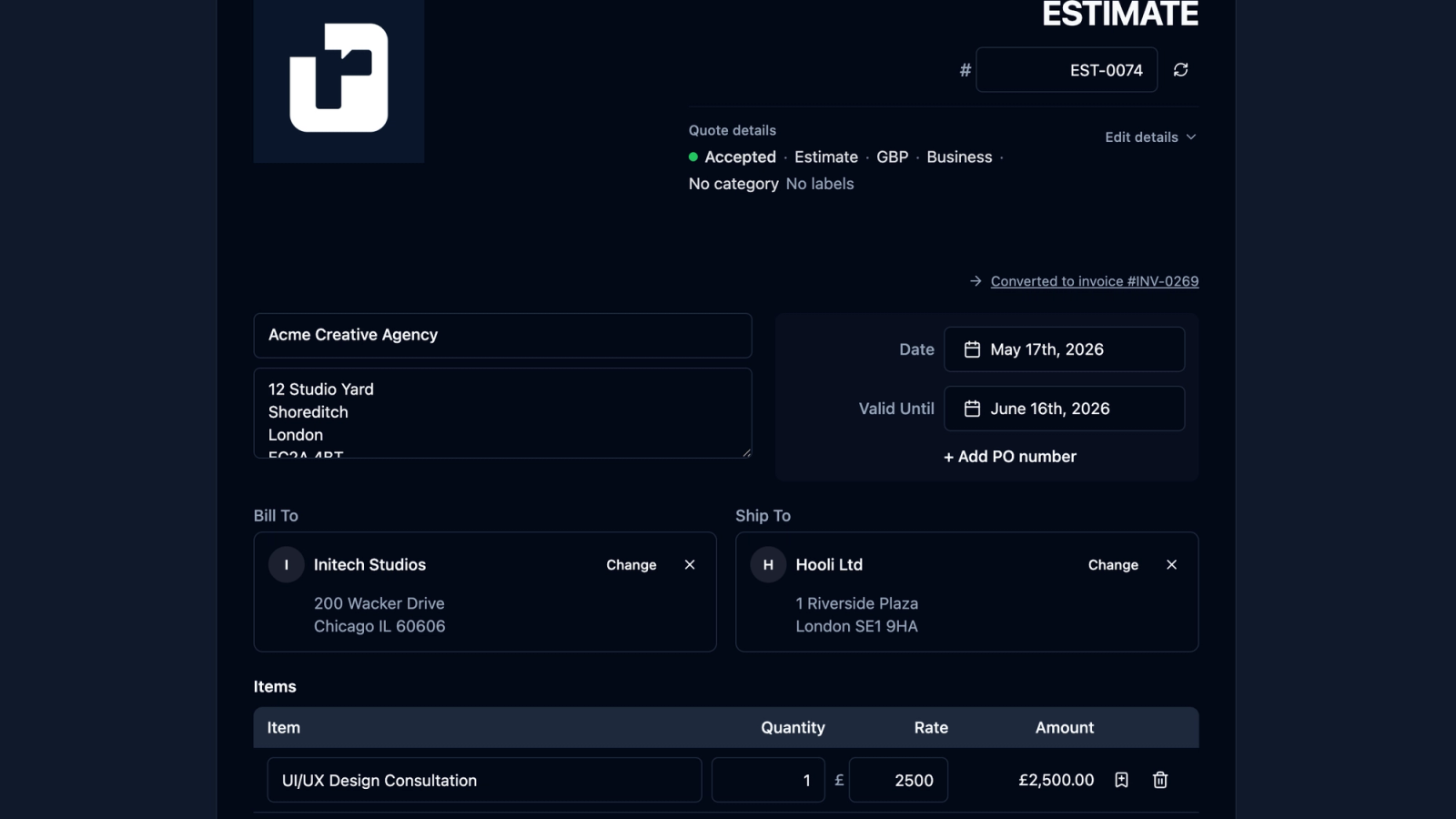
Quotes, estimates, and invoices are easy to confuse.
They all involve money. They all describe work, services, or products. They can all be sent to a client as a professional PDF.
But they are not the same thing.
An estimate helps a client understand a likely cost before the details are final.
A quote gives a clearer price for agreed work.
An invoice asks for payment after work has been agreed, delivered, or reached a billable stage.
For freelancers, sole traders, consultants, tradespeople, creatives, and independent workers, choosing the right document matters. It helps clients understand where they are in the process, reduces confusion, and makes your workflow feel more professional.
This guide explains the difference between a quote, an estimate, and an invoice — and how recevo.io helps you create all three without signing up for another account.
Create quotes, estimates and invoices for free with recevo.io.
Why the difference matters
When a client asks, “How much will this cost?”, they may not know whether they need an estimate or a quote.
When work is finished, they may expect an invoice.
If you send the wrong document at the wrong time, things can get unclear.
For example:
- an estimate may be treated as a fixed price when you meant it as a rough guide
- a quote may be too vague for the client to approve confidently
- an invoice may arrive before the client has agreed the work
- a client may delay payment because the document does not include the details their finance team needs
Clear documents make the process smoother.
They show the client what stage they are at:
- exploring the likely cost
- approving the work
- paying for the work
That clarity helps you look professional and reduces admin later.
What is an estimate?
An estimate is an approximate price.
It is useful when the full scope is not known yet, or when the final cost may depend on time, materials, complexity, or changes during the work.
For example, a freelancer might send an estimate when:
- a client has described a project but not finalised the scope
- the work may change once discovery begins
- materials or third-party costs are not confirmed
- the job depends on how long something takes
- the client wants a rough budget before deciding whether to continue
An estimate says, in effect:
“Based on what we know now, this is the likely cost.”
It is not usually the final payment request. It is a planning document.
What should an estimate include?
A useful estimate should be clear about what is known and what may change.
It might include:
- client details
- your business or trading details
- a description of the likely work
- expected line items
- estimated quantities or hours
- estimated rates or prices
- likely tax, if relevant
- possible assumptions
- what is not included
- an expiry or review date
- notes about what could change the final price
The assumptions are important.
If the estimate depends on the client providing content, materials, access, measurements, or approvals, say so.
That helps avoid the client treating a rough estimate as a fixed quote.
Example estimate use case
A freelance web designer might send an estimate like this:
“Estimated cost for a five-page brochure website, based on supplied copy and images: £1,200–£1,600.”
That gives the client a useful budget range.
But it also makes clear that the final price may depend on details such as content, design complexity, revisions, integrations, or extra pages.
What is a quote?
A quote is usually firmer than an estimate.
It gives the client a clearer price for a defined piece of work.
A quote is useful when the scope, deliverables, timeline, and price are understood well enough for the client to approve the work.
For example, a freelancer might send a quote when:
- the client has explained what they need
- the scope of work is clear
- deliverables are agreed
- the price can be stated confidently
- the client needs approval before the work starts
A quote says, in effect:
“This is what I will provide, and this is what it will cost.”
Exact rules and expectations can vary by country, industry, and contract. If a quote needs to be legally formal for your work, check appropriate guidance or speak to a professional adviser.
For everyday freelance admin, the key point is simple: a quote should be clearer and more committed than an estimate.
What should a quote include?
A professional quote should include enough detail for the client to say yes with confidence.
It might include:
- your business or trading details
- client details
- quote number
- issue date
- validity date
- scope of work
- deliverables
- timeline
- line items
- quantities and rates
- tax, discounts, or shipping if relevant
- terms and notes
- total price
- how the client can approve or accept it
The more clearly you define the work, the less room there is for misunderstanding later.
Example quote use case
A freelance copywriter might send a quote like this:
“Website copywriting package: homepage, about page, services page, and contact page. Includes discovery call, first draft, and two rounds of revisions. Total: £950. Valid until 31 July 2026.”
This is more specific than an estimate.
The client can see what is included, what it costs, and how long the quote remains valid.
What is an invoice?
An invoice is a request for payment.
It is usually sent after work has been delivered, after a project milestone, or according to agreed payment terms.
An invoice says:
“Payment is now due.”
For example, a freelancer might send an invoice when:
- a project is complete
- a deposit is due
- a milestone has been reached
- a monthly retainer needs billing
- a product or service has been supplied
- a quote has been accepted and the work is ready to bill
The invoice should be clear, complete, and easy for the client to process.
What should an invoice include?
A professional invoice should usually include:
- your business or trading details
- client billing details
- a unique invoice number
- issue date
- payment due date
- line item descriptions
- quantities and rates
- tax if relevant
- discounts or extra charges if relevant
- total amount due
- currency
- payment instructions
- payment terms
- optional purchase order or project reference
The invoice should also be easy to save and share.
That is why many clients expect invoices as PDFs. A PDF gives both sides a stable record of what was sent.
Example invoice use case
A freelance developer might send an invoice like this:
“Invoice INV-0042 for June development retainer. Total due: £2,400. Payment due by 30 June 2026. Please use invoice number INV-0042 as the payment reference.”
That gives the client a clear document to process and pay.
The simple difference
The easiest way to remember the difference is:
An estimate is a likely price before the details are final.
A quote is a clearer price for agreed work.
An invoice is a payment request.
In a typical freelance workflow, the sequence might look like this:
Estimate → Quote → Invoice
But not every project needs all three.
For simple work, you may go straight to a quote.
For repeat work, you may go straight to an invoice.
For uncertain work, you may start with an estimate before preparing a quote.
The right document depends on the stage of the client relationship.
When should you send an estimate?
Send an estimate when the client needs a rough idea of cost before the scope is clear.
This is useful for early conversations.
It helps the client understand whether the work is likely to fit their budget, without forcing you to commit to a final price too soon.
Estimates are especially useful when:
- the project is still being discussed
- the client has not provided enough detail
- costs depend on time or materials
- the job may grow or shrink
- discovery is needed before pricing properly
If you send an estimate, make the uncertainty clear.
Do not let an estimate look like a fixed quote unless that is what you intend.
When should you send a quote?
Send a quote when the client is ready to approve the work and the price is clear enough to commit to.
A quote works well when you can define:
- what you will do
- what the client will receive
- how much it will cost
- when the quote expires
- what is included
- what is not included
Quotes are helpful because they create a clear agreement before work starts.
They also make the later invoice easier, because the invoice can be based on the accepted quote.
When should you send an invoice?
Send an invoice when payment is due.
That may be:
- before work starts, if you take deposits
- at a project milestone
- after delivery
- at the end of the month
- on a recurring retainer schedule
- immediately after a quote is accepted, if payment is required upfront
The invoice should match what was agreed.
If the quote said £950 for a defined package, the invoice should make it easy for the client to connect the payment request back to that accepted quote.
Why quote-to-invoice workflow matters
A quote-to-invoice workflow saves time and reduces mistakes.
Without a proper workflow, freelancers often copy details manually from one document to another.
That can create problems:
- the client name may be typed differently
- line items may not match
- prices may be copied incorrectly
- terms may be forgotten
- PDFs may end up in different folders
- the final invoice may not clearly relate to the accepted quote
A better workflow carries the details forward.
The quote becomes the basis for the invoice.
That means less retyping, less checking, and fewer small errors.
How recevo.io helps with quotes, estimates, and invoices
recevo.io is private, no-signup invoicing for independent workers.
It includes a quote and estimate builder alongside the invoice workflow, so you can create professional documents from the same browser-based workspace.
With recevo.io, you can create quotes and estimates with:
- scope of work
- timelines
- deliverables
- validity dates
- line items
- tax
- discounts
- PDF export
- encrypted sharing
- private notes
- locking
- cloning
When a quote is accepted, you can convert it into an invoice with one click.
The details carry over automatically, which means you do not need to rebuild the invoice from scratch.
That is useful for freelancers who want a simple flow:
Quote it. Invoice it. Get paid.
Professional PDFs without a template headache
Quotes, estimates, and invoices should look professional.
But maintaining separate spreadsheet or document templates can become annoying.
Page breaks move. Logos shift. Totals need checking. Old files get duplicated. Formatting drifts over time.
recevo.io lets you create professional PDFs in the browser using built-in templates and branding options.
That means your quote, estimate, and invoice documents can feel consistent without design software or fragile manual templates.
Encrypted sharing and PDF export
Different clients prefer different delivery methods.
Some want a PDF attached to an email.
Some are happy with a link.
recevo.io supports both PDF export and encrypted read-only sharing for invoices and quotes.
Shared links should still be treated as sensitive, just like PDF attachments. Private notes, audit history, and tax classifications are not included in shared links.
That helps you share client-facing documents without exposing your internal notes.
Why no signup matters
Many tools make you create an account before you can send a quote or invoice.
recevo.io does not.
You can open the app and start creating documents — no account required.
There is no email address, password, trial, or subscription needed to use the core no-signup app.
That makes recevo.io useful when you want to send a professional document quickly without committing to a full software setup.
Your normal workspace lives in your browser
recevo.io is browser-based by design.
Your normal workspace is not stored in a central recevo.io invoice database. It lives in your browser.
That is a privacy and ownership choice.
The trade-off is that if browser data is cleared, your local workspace can be lost unless you have a backup.
recevo.io supports manual JSON Backup & Restore. Backup files are plain JSON for portability and transparency, so they may contain sensitive business data and should be stored securely.
Optional Encrypted Cloud Backup is also available as an off-device safety net. It is opt-in, off by default, and is not real-time cloud sync or team collaboration.
Is recevo.io accounting software?
No.
recevo.io is an invoicing-first tool for independent workers.
It includes useful depth around quotes, expenses, payment tracking, live P&L visibility, categories, tax classification, and accountant-ready exports, but it is not accounting software, tax filing software, payroll software, or a replacement for your accountant.
That distinction is important.
The goal is not to make you learn a full accounting platform.
The goal is to help you quote, invoice, and keep your records organised without unnecessary overhead.
Common mistakes to avoid
Treating every estimate as a fixed quote
If the final cost may change, make that clear.
Use wording that explains the estimate is based on current information and may change if the scope changes.
Sending vague quotes
A quote should be specific enough for the client to approve.
Include scope, deliverables, price, validity date, and anything important that is excluded.
Forgetting quote expiry dates
A quote validity date helps avoid old prices being accepted months later.
This is especially useful if your rates, supplier costs, or availability change.
Rebuilding invoices manually
If a quote has been accepted, avoid retyping all the same details into a new invoice.
Use a quote-to-invoice workflow so the invoice matches what was agreed.
Sending an invoice before agreement
Unless your terms require upfront payment, sending an invoice before the client has approved the work can create confusion.
Use a quote or estimate first when the client still needs to decide.
Frequently asked questions
What is the difference between a quote and an estimate?
An estimate is an approximate price based on the information available at the time. A quote is usually a clearer price for a defined piece of work.
Exact expectations can vary, so make your wording, scope, and terms clear.
What is the difference between a quote and an invoice?
A quote is sent before payment is due, usually so the client can approve the work and price. An invoice is sent when payment is due.
A quote helps the client decide. An invoice asks the client to pay.
Can an estimate become an invoice?
Usually, an estimate should become a quote first once the scope and price are clearer. Then, when work is approved or payment is due, the quote can become an invoice.
For very simple work, you may move directly from estimate to invoice if the client has clearly agreed.
Can a quote become an invoice?
Yes. This is a common freelance workflow.
With recevo.io, you can convert an accepted quote into an invoice with one click, carrying over the details automatically.
Should I send a quote or an invoice first?
Send a quote when the client still needs to approve the work and price. Send an invoice when payment is due.
If the scope is uncertain, start with an estimate.
Do I need an account to create quotes and invoices with recevo.io?
No. Open the app and start creating quotes and invoices — no account required.
recevo.io does not require an email address, password, trial, or subscription to use the core no-signup app.
Can I export quotes and invoices as PDFs?
Yes. recevo.io lets you export professional quote and invoice PDFs in your browser.
You can also share invoices and quotes through encrypted read-only links.
Create your first quote or invoice
The difference between an estimate, quote, and invoice is simple once you think about the stage of work.
Estimate the likely cost.
Quote the agreed work.
Invoice when payment is due.
With recevo.io, you can create professional quotes, estimates, and invoices in your browser — then convert accepted quotes into invoices without rebuilding the document from scratch.
Create your first quote or invoice here:
Quote it, invoice it, and keep your records organised — no signup required.
Unlimited invoices, quotes & expenses · Free forever
Start with a quote, finish with an invoice
Create the quote, share a read-only link, and convert it to an invoice the moment it is accepted. Free, no sign-up, no invoice limits.
Free forever · No account · No card · No watermark · Opens in a new tab
Unlike most free invoice tools:
- Unlimited invoices and quotes
- Branded PDFs with no watermark
- Works offline in your browser
- Your data never leaves your device
- Expenses and profit tracking included
- No account, no card, no premium tier

“Detailed quotes with my own payment terms, and my income at a glance.”