
Making Tax Digital Record Preparation for Sole Traders
Making Tax Digital is making record keeping more important for UK sole traders. recevo.io helps you organise invoices, expenses, receipts, categories, and CSV exports in one browser-based workspace, ready to hand to your accountant for review and filing with MTD-compatible software.
Making Tax Digital is changing how many UK sole traders think about business records.
Instead of collecting invoices, receipts, expenses, and spreadsheets at the end of the tax year, sole traders increasingly need cleaner digital records throughout the year.
That does not mean every independent worker wants a heavy accounting platform.
Many sole traders still want something simpler: a fast way to create invoices, record expenses, attach receipts, export CSV files, and send organised records to an accountant.
That is where recevo.io can help.
recevo.io is a private, no-signup invoicing app for independent workers. It helps you keep invoices, quotes, expenses, receipt attachments, categories, payment records, and CSV exports organised in your browser.
For Making Tax Digital record preparation, that can be useful.
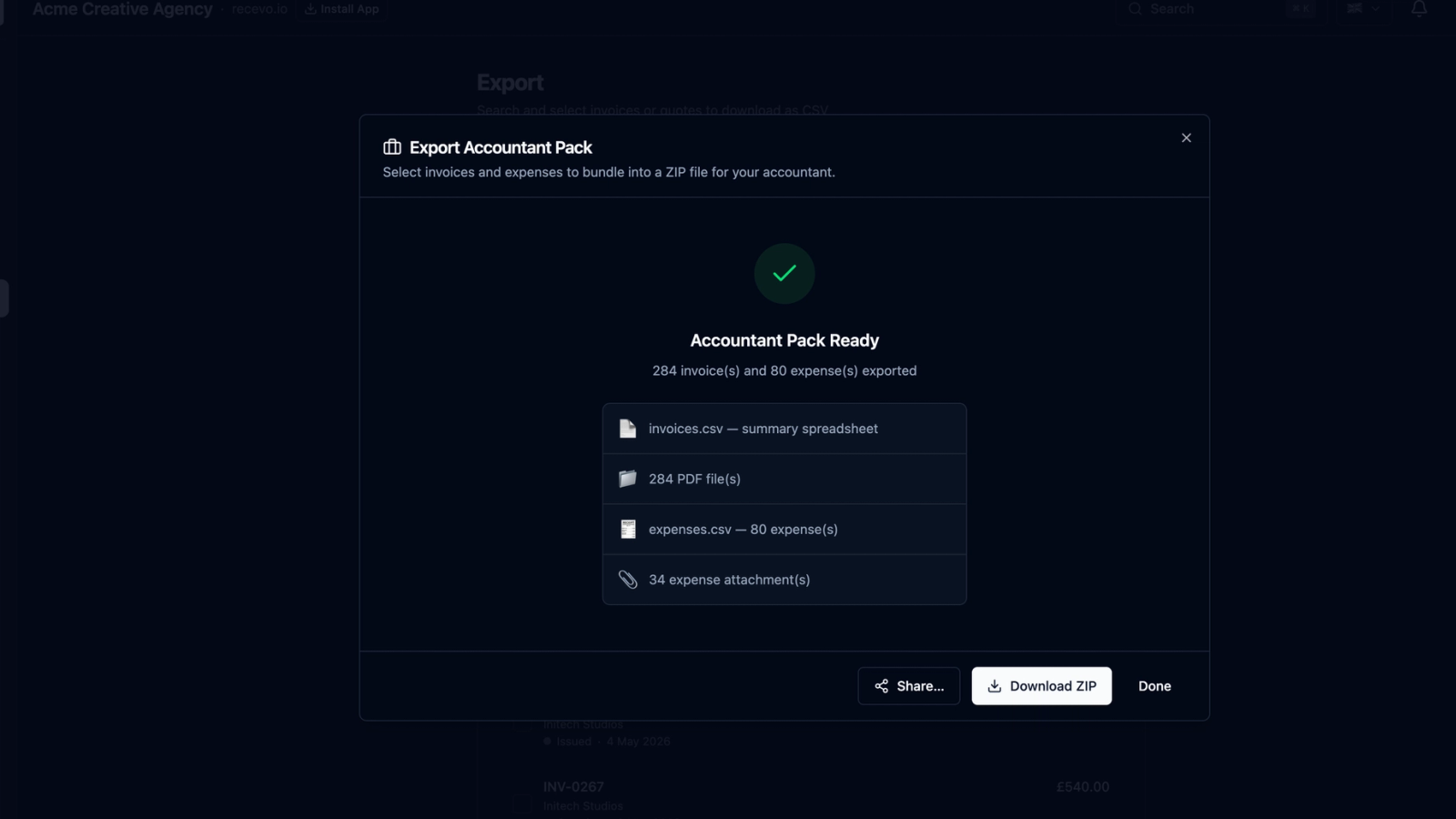
You can keep your day-to-day records in recevo.io, then export an Accountant Pack containing invoice PDFs, expense attachments, and spreadsheet-friendly CSV files for your accountant to review.
Your accountant can then use their own Making Tax Digital-compatible software to handle the required HMRC submissions.
A clear note before we go further
recevo.io is not Making Tax Digital filing software.
It is not HMRC-recognised MTD software. It does not connect to HMRC, submit quarterly updates, submit VAT returns, or file your Income Tax return.
If you need to file under Making Tax Digital, you or your accountant must use software that works with HMRC’s MTD service.
recevo.io’s role is record preparation.
It helps sole traders keep invoice and expense records cleaner before those records are reviewed, imported, adjusted, or submitted through the proper MTD-compatible software.
In simple terms:
recevo.io helps you prepare the records.
Your accountant or MTD software handles the filing.
Why Making Tax Digital record preparation matters
Making Tax Digital puts more emphasis on regular digital record keeping.
For affected sole traders, business income and expenses need to be kept digitally and reported through compatible software.
Even when an accountant handles the filing, they still need accurate records from you.
That is often where the real admin happens.
If your invoice PDFs are in one folder, receipt photos are on your phone, supplier invoices are in your inbox, and expense notes are in a spreadsheet, your accountant has to spend more time reconstructing your records.
Cleaner records make that handoff easier.
They also help you understand your business during the year, rather than waiting until your accountant asks for everything at once.
What sole traders need to keep organised
If you are a sole trader, your business records may include invoices issued, payments received, expenses, receipts, supplier invoices, categories, tax notes, and export files.
A good record-preparation workflow should help you keep those things together.
Invoices issued
Your invoices show what you charged, who you charged, when the invoice was issued, when payment was due, what tax or discounts were applied, and whether the invoice has been paid.
In recevo.io, invoices are structured records, not just standalone PDFs. That means invoice details can be reviewed, tracked, and exported later.
Payments received
For many sole traders, it is not enough to know what was invoiced. You also need to know what was paid.
recevo.io lets you record payment details and mark invoices as paid, helping you keep a clearer view of outstanding and settled invoices.
Expenses
Business expenses affect your profit and your tax records.
You might need to record software subscriptions, tools, materials, travel, phone bills, hosting, insurance, equipment, professional fees, subcontractors, or other business costs.
recevo.io lets you record expenses alongside invoices, so your income and costs are not split across unrelated files.
Receipts and supplier invoices
Expense records are more useful when the supporting documents are attached.
recevo.io lets you attach receipt images, scanned receipts, supplier invoice PDFs, and other supporting files to expense records.
That can make accountant handoff much easier, because the evidence for an expense stays connected to the record.
Categories and tax classifications
Categories help your accountant understand what each record relates to.
For example, expenses might be grouped under software, travel, materials, insurance, hosting, equipment, subcontractors, or professional fees.
recevo.io also includes simple tax classification options, such as business income, excluded income, allowable expense, non-allowable expense, and personal.
These are preparation aids, not tax advice. Your accountant should always review the final treatment.
CSV exports
CSV files are useful because they can be opened in spreadsheet software, reviewed by an accountant, filtered, totalled, imported, or used as part of a wider bookkeeping workflow.
recevo.io can export invoice and expense data in spreadsheet-friendly form, helping your accountant work from structured records rather than extracting numbers manually from PDFs.
How recevo.io helps with Making Tax Digital record preparation
recevo.io helps with the practical record-keeping layer before MTD filing.
It gives sole traders a browser-based workspace for invoices, quotes, expenses, receipts, categories, payment records, and exports.
The goal is not to replace MTD-compatible accounting software. The goal is to make the records you give your accountant cleaner and easier to work with.
1. Create invoices in one place
Invoices are the foundation of many sole trader records.
With recevo.io, you can create professional invoices in your browser, add client details, include line items, apply tax or discounts, set due dates, add payment terms, and export branded PDFs.
You can also record payment status, mark invoices as paid, and keep track of what is outstanding.
For MTD record preparation, this structure is useful because your invoice records are not scattered across old documents, downloads, and email attachments.
2. Export invoice PDFs for accountant review
Your accountant may need to see the actual invoices you issued.
recevo.io’s Accountant Pack can include PDF copies of selected invoices, bundled into a ZIP file.
This gives your accountant a clean set of invoice documents to review, rather than a messy collection of files from different folders.
Invoice PDFs are useful because they show the document as it appeared to the client, including line items, payment terms, notes, totals, and branding.
3. Export invoice CSV files
PDFs are useful for human review, but structured data is usually easier to analyse.
That is why CSV exports matter.
A CSV file can be opened in spreadsheet software, checked by invoice date, filtered by client, reviewed by status, totalled by period, or imported into another workflow.
recevo.io can export invoice data in spreadsheet-friendly form so your accountant does not have to manually extract numbers from invoice PDFs.
For quarterly record preparation, that can save time and reduce the chance of transcription errors.
4. Record expenses throughout the year
Making Tax Digital preparation is not just about income.
Expenses matter too.
With recevo.io, you can record expenses as they happen. You can add payee details, dates, amounts, notes, categories, and tax classifications.
This makes it easier to keep track of business costs before your accountant asks for them.
Instead of rebuilding a quarter from your bank account, inbox, photos, and memory, you can keep expense records inside the same workspace as your invoices.
5. Attach receipts and supplier invoices
Receipts are easy to lose when they live separately from your records.
recevo.io lets you attach supporting files to expense records, including receipt images and supplier invoice PDFs.
When you export an Accountant Pack, those attachments can be included alongside the CSV spreadsheets.
That gives your accountant more context and reduces the chance of missing evidence for a business cost.
6. Use categories to organise records
Categories help turn raw records into something more useful.
You might categorise income by service type, project type, client type, or revenue stream.
You might categorise expenses by software, materials, travel, insurance, equipment, professional fees, hosting, or subcontractors.
recevo.io lets you apply categories to invoices and expenses, then include category information in exports.
This can help your accountant review records more quickly and understand what each item relates to.
7. Use tax classifications as preparation notes
recevo.io includes simple tax classification options for invoices, quotes, and expenses.
For income, records can be marked as business income or excluded.
For expenses, records can be marked as allowable, non-allowable, or personal.
These classifications are not a substitute for accountant review. They are a way to organise your records and flag your understanding before handing them over.
Your accountant can then confirm, correct, or adjust the treatment as needed.
8. Export an Accountant Pack for each period
A practical Making Tax Digital preparation workflow might be quarterly.
At the end of each quarter, you review your recevo.io workspace.
You check invoices issued during the period.
You record payments received.
You add any missing expenses.
You attach receipts or supplier invoices.
You review categories and tax classifications.
Then you export an Accountant Pack.
The ZIP file can include invoice PDFs, expense attachments, and CSV spreadsheets of invoices and expenses.
You send that pack to your accountant. They review the records, ask any questions, make any adjustments, and use their own MTD-compatible software to submit updates or returns where required.
recevo.io helps with the preparation. Your accountant and filing software handle the submission.
A simple quarterly routine for sole traders
If Making Tax Digital applies to you, or if you simply want to prepare early, a regular routine can help.
During the quarter
Create invoices in recevo.io as you work.
Record payments when clients pay.
Add expenses as they happen.
Attach receipts before they get lost.
Keep categories and notes up to date.
At the end of the quarter
Review invoice statuses.
Check for unpaid or overdue invoices.
Add any missing expenses.
Make sure receipt attachments are linked to the right records.
Review categories and tax classifications.
Before sending records to your accountant
Export an Accountant Pack.
Check that the ZIP contains the invoice PDFs, expense attachments, and CSV files your accountant needs.
Store a copy securely for your own records.
Send the pack to your accountant using their preferred method.
Accountant review and MTD filing
Your accountant reviews the CSV files, invoice PDFs, and expense attachments.
They make any corrections or adjustments.
They use MTD-compatible software to handle the HMRC submission.
This routine is much easier than waiting until the end of the year and trying to find everything at once.
Why the Accountant Pack is useful
The Accountant Pack is useful because it keeps related files together.
Instead of sending separate emails with invoice PDFs, receipt images, supplier invoices, spreadsheets, and notes, you can create a single ZIP file.
That ZIP file can include invoice PDFs, expense attachments, invoice CSVs, and expense CSVs.
For accountant handoff, that is much cleaner than scattered files.
For Making Tax Digital preparation, it creates a clearer bridge between day-to-day invoicing and the formal filing process.
recevo.io vs MTD-compatible accounting software
recevo.io and MTD-compatible accounting software do different jobs.
MTD-compatible software is used for the official filing workflow. Depending on the tax, business type, and rules that apply to you, that may include keeping digital records, sending quarterly updates, and submitting returns through HMRC’s Making Tax Digital service.
recevo.io helps independent workers create invoices, record expenses, attach receipts, export PDFs, export CSVs, and prepare records for an accountant.
That distinction is important.
If you want software that files directly with HMRC, use recognised MTD-compatible software.
If you want a simple, private, no-signup invoicing workspace that helps you prepare cleaner records for your accountant, recevo.io can help.
Many sole traders may use both: recevo.io for invoicing and record preparation, and their accountant’s MTD-compatible software for review and filing.
What recevo.io does not do
To avoid confusion, recevo.io does not:
submit quarterly updates to HMRC,
submit VAT returns,
submit Income Tax returns,
connect directly to HMRC,
replace your accountant,
provide tax advice,
guarantee that your records satisfy every MTD requirement,
or remove your responsibility to check what applies to you.
recevo.io is designed as private, no-signup invoicing for independent workers.
Its Making Tax Digital value is in record preparation and export, not direct filing.
What to ask your accountant
Before relying on any record-keeping workflow, ask your accountant how they want to receive your records.
Useful questions include:
Can you work from CSV exports from my invoicing tool?
Which fields do you need in the invoice and expense CSV files?
How often should I send you an Accountant Pack?
Should I export records monthly, quarterly, or at year-end?
How should I categorise expenses?
Do you want receipts attached to each expense record?
Which MTD-compatible software will you use to file?
Do you need anything else from me before each quarterly update?
These questions help make sure your recevo.io records fit your accountant’s process.
Private, no-signup record preparation
One reason sole traders may prefer recevo.io is its browser-first model.
You do not need to create an account to start using it. Your workspace lives in your browser rather than a central recevo.io invoice database.
That matters because invoice and expense records can contain sensitive business data: client names, addresses, project details, rates, totals, receipts, supplier information, and payment notes.
recevo.io is designed for independent workers who want useful invoicing tools without handing their entire business record set to another cloud account just to create invoices and exports.
The trade-off is that backups matter.
Because your workspace is local to your browser, you should use Backup & Restore and store important exports securely. If you clear browser data or reset your device without a backup, your local workspace can be deleted.
For many privacy-conscious sole traders, that trade-off is worth understanding.
Who is this workflow for?
This workflow is useful for UK sole traders who want to keep cleaner records for their accountant.
It may suit freelancers, consultants, designers, developers, copywriters, photographers, tradespeople, tutors, coaches, side hustlers, and other independent workers.
It is especially useful if you want simple invoicing during the year, but need organised exports when your accountant asks for records.
Making Tax Digital preparation without accounting-suite bloat
Some sole traders need a full accounting platform.
If you need bank feeds, automatic reconciliation, payroll, team access, VAT filing, direct HMRC submission, or deep accountant collaboration, dedicated accounting software may be the right choice.
But not every sole trader wants to run their business from a heavy platform.
recevo.io sits in a simpler space.
It helps you create invoices, send quotes, track expenses, attach receipts, export PDFs, export CSVs, and prepare an Accountant Pack.
It gives you more structure than a basic invoice generator, without pretending to be full MTD filing software.
Frequently asked questions
Is recevo.io MTD compliant?
No. recevo.io is not HMRC-recognised MTD-compatible filing software and does not submit updates or returns to HMRC. It can help with record preparation by keeping invoices, expenses, receipt attachments, and CSV exports organised for your accountant.
Can recevo.io submit Making Tax Digital quarterly updates?
No. recevo.io does not submit quarterly updates to HMRC. Your accountant, or you, must use recognised MTD-compatible software for submissions.
Can I use recevo.io to keep records for Making Tax Digital?
recevo.io can help you keep invoice and expense records organised, but you should check with your accountant whether your workflow is suitable for your MTD obligations. recevo.io is best viewed as a record-preparation and export tool.
What is an Accountant Pack?
An Accountant Pack is a ZIP export from recevo.io that can include invoice PDFs, expense attachments, and CSV spreadsheets of your invoice and expense records. It is designed to make accountant handoff easier.
Can my accountant use recevo.io exports?
Your accountant may be able to use the PDF, attachment, and CSV exports as part of their review process. Ask your accountant what format they prefer and whether they can import or work from CSV files in their own MTD-compatible software.
Does recevo.io provide tax advice?
No. recevo.io does not provide tax advice. Features such as categories, tax classifications, and estimated taxable profit are preparation aids only. Always check tax treatment with your accountant or adviser.
Do sole traders need Making Tax Digital software?
Some sole traders must use MTD-compatible software depending on their income, business type, and the relevant start date. You should check current GOV.UK guidance or speak to your accountant to confirm if and when Making Tax Digital applies to you.
How often should I export records from recevo.io?
If you are preparing for MTD, quarterly exports may be useful. Some sole traders may prefer monthly exports to stay ahead. Ask your accountant how often they want to receive records.
Prepare cleaner records for your accountant
Making Tax Digital makes record keeping more important for sole traders.
recevo.io does not file MTD returns and is not HMRC-integrated. But it can help you stay organised before the filing step.
Create invoices, record expenses, attach receipts, categorise records, export CSV spreadsheets, and generate an Accountant Pack for your accountant.
No signup. No subscription. No invoice limits. Just private, browser-based invoicing and record preparation for independent workers.
Start here:
Unlimited invoices, quotes & expenses · Free forever
Keep every expense next to the invoice it belongs to
Track one-off and recurring costs, attach receipts, and export an Accountant Pack when tax time comes. Free forever, no account needed.
Free forever · No account · No card · No watermark · Opens in a new tab
Unlike most free invoice tools:
- Unlimited invoices and quotes
- Branded PDFs with no watermark
- Works offline in your browser
- Your data never leaves your device
- Expenses and profit tracking included
- No account, no card, no premium tier

“I log every expense and see my net profit update in real time.”