
Encrypted Cloud Backup: An Off-Device Safety Net That recevo.io Cannot Read
Encrypted Cloud Backup gives recevo.io users an opt-in, end-to-end encrypted safety net for their browser-based invoicing workspace. Back up invoices, quotes, expenses, receipts, customers, settings, and more to the cloud as unreadable ciphertext — with no account, no password, and a recovery link only you control.
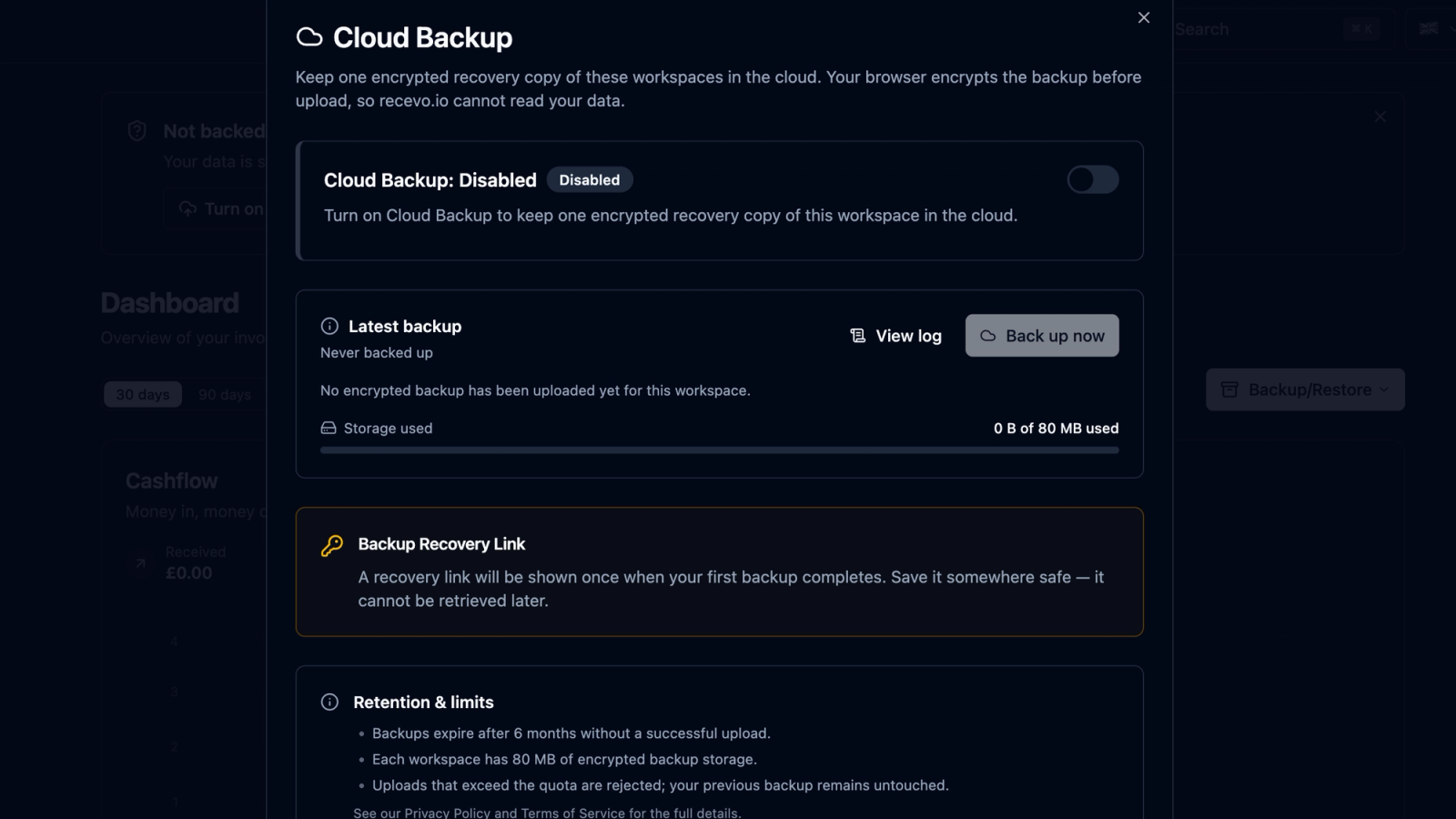
recevo.io has always made a deliberate trade-off.
Instead of forcing you to create an account and storing your invoicing workspace in a central cloud database, recevo.io keeps your invoices, quotes, expenses, customers, and settings in your browser.
That browser-first model is what makes recevo.io private, no-signup, fast to start, and useful offline.
But it also creates one important responsibility:
You need to back up your data.
Until now, the answer was simple: export a JSON backup regularly and store it somewhere safe.
That still works. It is still a good habit. It still gives you a portable copy of your workspace.
But it depends on you remembering to do it.
Today, recevo.io adds a new option:
Encrypted Cloud Backup.
Encrypted Cloud Backup is an opt-in, end-to-end encrypted, off-device safety net for your recevo.io workspace. It can automatically back up your data roughly every 24 hours while the app is open, store it safely off your device, and let you restore it later using a recovery link only you control.
No account.
No password.
No cloud workspace database.
No readable invoice data on our servers.
Just an encrypted backup that recevo.io cannot read.
Why Encrypted Cloud Backup matters
The most common concern with browser-first apps is simple:
What happens if I clear my browser data?
That is a fair question.
Because recevo.io stores your normal workspace in your browser, your data can be lost if browser storage is cleared, your device is reset, your browser profile is removed, or you move to a new device without a backup.
That local-first model gives you privacy and control, but it also means backups matter.
Encrypted Cloud Backup is designed to close that gap without changing the core recevo.io philosophy.
Your workspace is still not stored in a normal vendor-controlled cloud database.
You still do not need an account.
You still do not need an email address or password.
And recevo.io still cannot read your invoices, quotes, expenses, receipts, customers, or settings from the backup.
Instead, the app encrypts your workspace in your browser before anything leaves your device, then stores only encrypted data in the cloud.
That means you get the practical safety of an off-device backup without turning recevo.io into a traditional cloud invoicing platform.
What is Encrypted Cloud Backup?
Encrypted Cloud Backup is a new opt-in backup feature for recevo.io.
When enabled, it creates an encrypted archive of your workspace and stores it off-device. The backup is end-to-end encrypted in your browser before upload, so the cloud only receives unreadable ciphertext.
In plain English: your backup exists in the cloud, but recevo.io cannot read what is inside it.
The feature is designed for independent workers who like the privacy and simplicity of recevo.io’s browser-first model, but want more protection against accidental browser data loss.
It is especially useful if you:
use recevo.io for real business records,
create invoices and quotes regularly,
track expenses and receipts,
want protection if your device is lost,
worry about accidentally clearing browser data,
or want an automatic backup habit without remembering to export manually every time.
Opt-in and off by default
Encrypted Cloud Backup is off by default.
Nothing about your workspace is uploaded unless you choose to turn the feature on.
That matters.
recevo.io’s default model remains browser-first. Your normal workspace lives in your browser. If you prefer to use only local JSON backups, you can keep doing that.
Encrypted Cloud Backup is there for users who want an additional off-device safety net.
You decide whether to enable it.
How Encrypted Cloud Backup works
The workflow is designed to be simple.
You turn it on once, save your recovery link, and recevo.io can then create encrypted backups automatically while the app is open.
Here is the process.
1. Turn on Cloud Backup
Inside recevo.io, you enable Encrypted Cloud Backup with a toggle.
Until you do that, the feature does nothing. Your workspace stays entirely local to your browser, just as before.
Once enabled, recevo.io prepares an encrypted cloud backup of your workspace.
2. Save your recovery link
When you enable Encrypted Cloud Backup, recevo.io shows you a Backup Recovery Link.
It looks like this:
https://recevo.io/restore/<backup-id>#_t=<backup-secret>
This link is extremely important.
It is the key to your backup.
The backup ID identifies the encrypted backup. The secret after the #_t= fragment is what allows the backup to be decrypted locally in your browser.
The secret lives in the URL fragment, which browsers do not send to servers in normal HTTP requests.
That means recevo.io’s servers do not receive the decryption secret.
You should store this recovery link in a password manager or another secure place.
recevo.io shows it once and cannot regenerate it later.
That is not a limitation by accident. It is part of the zero-knowledge design.
3. recevo.io creates encrypted backups automatically
Once enabled, recevo.io can take a fresh encrypted backup roughly every 24 hours while the app is open.
You can also trigger a backup manually with the “Back up now” button.
This gives you both convenience and control.
The automatic cadence helps protect you when you forget to export manually. The on-demand button lets you back up immediately after important changes, such as creating a batch of invoices, adding expenses, attaching receipts, or preparing records for your accountant.
4. Your workspace is encrypted before upload
The backup is encrypted in your browser before a single byte leaves your device.
Encrypted Cloud Backup uses AES-256-GCM for browser-side encryption.
The cloud receives only opaque encrypted data.
That means the backup can be stored off-device, but the contents remain unreadable without the recovery secret.
recevo.io cannot browse your invoice data, customer names, amounts, receipt attachments, or business records from the cloud backup.
5. Restore on another device
If you need to restore your workspace, open your Backup Recovery Link in a browser.
recevo.io fetches the encrypted backup, uses the secret from the URL fragment to decrypt it locally, and then restores it through the same trusted Restore pipeline used by the existing JSON Backup & Restore feature.
This makes it useful if you lose a device, move to a new laptop, accidentally clear browser data, or need to restore your workspace into another browser.
The recovery link is what makes the restore possible.
Without it, the encrypted backup cannot be decrypted.
6. Delete the cloud backup whenever you want
Encrypted Cloud Backup also includes a delete option.
If you no longer want the cloud copy, you can permanently delete it.
The delete action is authorised by the recovery link itself. In other words, control belongs to whoever holds the recovery link.
That is another reason to store the link securely.
What gets backed up?
Encrypted Cloud Backup is designed to protect your recevo.io workspace, not just one invoice.
A backup can include:
all workspaces,
invoices,
quotes,
expenses,
customers,
payees,
line item library,
labels,
categories,
branding,
settings,
encrypted receipt attachments,
and app preferences.
The goal is to make restore feel practical on another device or browser.
If your workspace matters to your business, your backup should cover the workspace as a whole.
What makes this different from cloud sync?
Encrypted Cloud Backup is not cloud sync.
That distinction matters.
Cloud sync usually means your live workspace is stored in a vendor-controlled cloud account and kept in sync across devices.
Encrypted Cloud Backup does something different.
It creates an encrypted snapshot of your workspace and stores that snapshot off-device.
The backup is there if you need to restore. It is not a live multi-device workspace, team database, collaboration system, or cloud accounting account.
That is deliberate.
recevo.io is still a single-user, browser-first invoicing app. Encrypted Cloud Backup adds a safety net without changing the product into a traditional cloud SaaS tool.
What makes this different from manual JSON backups?
Manual JSON backups are still useful.
They are portable, readable, and under your direct control. You can export them, store them securely, archive them with your business records, and inspect the format outside recevo.io.
Encrypted Cloud Backup complements that workflow.
It is automatic, off-device, encrypted, and designed to reduce the risk of forgetting to back up.
You can use either method, or both.
A sensible approach is to keep Encrypted Cloud Backup enabled for ongoing protection, and still export manual JSON backups at important moments such as month-end, quarter-end, year-end, before clearing browser data, or before moving devices.
The recovery link is everything
Encrypted Cloud Backup is designed around one important idea:
The recovery link replaces the need for an account.
There is no email address, no password, no login, and no support process that can unlock your backup for you.
Possession of the recovery link is what authorises restore and delete.
That makes the system simple and private, but it also means you must protect the link carefully.
If someone else gets the full recovery link, they may be able to restore or delete the backup.
If you lose the recovery link, recevo.io cannot regenerate it and cannot recover your backup.
That is the cost of zero-knowledge encryption.
It is also the point.
If recevo.io could recover the link for you, recevo.io would have too much power over your backup.
Store your recovery link in a password manager
The best place for your recovery link is a password manager or another secure storage location you trust.
Do not leave it in a random notes file, public document, shared chat, or unprotected email thread.
Treat it like a key to your business records.
A good habit is to save the recovery link immediately when recevo.io shows it.
Then, after saving it, confirm you know where it is.
You only need to do this once, but it matters.
What Encrypted Cloud Backup is not
Encrypted Cloud Backup is designed to be useful, but it is important to be clear about what it does not do.
It is not real-time cloud sync.
Backups run on a roughly 24-hour cadence while the app is open, plus on-demand when you press “Back up now”.
It is not team collaboration.
recevo.io remains a single-user tool. There are no shared team workspaces, permissions, accountant logins, or multi-user controls.
It is not a replacement for manual exports.
JSON Backup & Restore remains useful, especially when you want a readable portable copy under your own control.
It is not recoverable without the recovery link.
If you lose the recovery link, recevo.io cannot regenerate it and cannot decrypt your backup for you.
It is not a cloud accounting platform.
recevo.io remains an invoicing-first tool for independent workers, not payroll software, bank-feed reconciliation software, tax filing software, or a full accounting suite.
Why this fits recevo.io
Encrypted Cloud Backup might sound like a shift toward the cloud.
But it is actually designed to preserve the original recevo.io model.
The goal is not to store your workspace in a readable cloud account.
The goal is to give independent workers an off-device safety net while keeping the privacy properties that make recevo.io different.
Your data is encrypted before it leaves your browser.
The server stores ciphertext only.
The decryption secret stays in your recovery link.
There is still no account.
There is still no password.
There is still no central readable invoice database.
That makes Encrypted Cloud Backup the kind of cloud feature recevo.io was willing to build: useful, optional, and privacy-preserving.
A better answer to “what if I clear my browser data?”
Before Encrypted Cloud Backup, the answer was:
Export a JSON backup regularly and store it somewhere safe.
That is still good advice.
But now there is a stronger answer:
Turn on Encrypted Cloud Backup, save your recovery link, and keep an encrypted off-device safety net.
If browser data is cleared, your device is lost, or you move to a new machine, you have a restore path — as long as you kept your recovery link safe.
This does not remove your responsibility to back up carefully.
It makes the backup habit easier.
A practical backup workflow
Here is a sensible way to use the new feature.
Turn on Encrypted Cloud Backup.
Save the recovery link in a password manager.
Use “Back up now” after major changes.
Leave the app open regularly so automatic backups can run.
Check the in-app backup log to confirm backups are healthy.
Export manual JSON backups at important milestones.
Store accountant exports separately when you need them.
This gives you multiple layers of protection without giving up the privacy-first model.
Who should enable Encrypted Cloud Backup?
Encrypted Cloud Backup is useful for anyone who uses recevo.io for real business records.
It is especially helpful for freelancers, sole traders, consultants, creatives, tradespeople, side hustlers, and privacy-conscious professionals who want to reduce the risk of losing local browser data.
If you only use recevo.io for a one-off test invoice, you may not need it.
If you use recevo.io to manage actual invoices, quotes, expenses, receipts, and accountant records, it is worth enabling.
The more important your workspace becomes, the more useful an off-device backup becomes.
Frequently asked questions
Is Encrypted Cloud Backup on by default?
No. Encrypted Cloud Backup is opt-in and off by default. Nothing about your workspace is uploaded unless you choose to turn it on.
Does recevo.io need an account for cloud backups?
No. Encrypted Cloud Backup does not require an account, email address, password, or login. The recovery link is what authorises restore and delete.
Can recevo.io read my cloud backup?
No. The backup is encrypted in your browser before upload. recevo.io stores opaque ciphertext and does not receive the decryption secret.
Where is the decryption secret stored?
The decryption secret is stored in the recovery link’s URL fragment. Browsers do not send URL fragments to servers in normal HTTP requests, so recevo.io’s servers do not receive the secret.
What happens if I lose my recovery link?
If you lose your recovery link, your cloud backup cannot be restored. recevo.io cannot regenerate the link or decrypt the backup for you.
Can someone else restore my backup if they get the link?
Anyone with the full recovery link may be able to restore or delete the backup. Treat the link as sensitive and store it securely, ideally in a password manager.
How often does Encrypted Cloud Backup run?
Backups run roughly every 24 hours while the app is open. You can also trigger a backup manually with the “Back up now” button.
Is this the same as cloud sync?
No. Encrypted Cloud Backup is not real-time cloud sync. It creates encrypted backup snapshots for restore. It does not create a live shared workspace across devices.
Should I still export manual JSON backups?
Yes, if you want an extra layer of protection. Encrypted Cloud Backup complements JSON Backup & Restore; it does not make manual exports useless.
Can I delete my cloud backup?
Yes. You can permanently delete the cloud copy. The delete is authorised by the recovery link itself.
A safer browser-first workspace
recevo.io remains private, no-signup invoicing for independent workers.
Your normal workspace still lives in your browser. The app still works offline once loaded. You still do not need an account, password, or subscription.
Encrypted Cloud Backup adds something important: an automatic, end-to-end encrypted, off-device safety net that recevo.io cannot read.
It is cloud backup without turning recevo.io into a cloud accounting platform.
Turn it on, save your recovery link, and protect your invoices, quotes, expenses, receipts, customers, and settings with a backup designed for the way recevo.io works.
Open recevo.io here:
Unlimited invoices, quotes & expenses · Free forever
Private invoicing, free forever
No account, no central database, no ads. Open the app and start invoicing with your data under your control.
Free forever · No account · No card · Nothing uploaded · Opens in a new tab
Unlike most free invoice tools:
- Unlimited invoices and quotes
- Branded PDFs with no watermark
- Works offline in your browser
- Your data never leaves your device
- Expenses and profit tracking included
- No account, no card, no premium tier

“My data isn't sitting in some vendor's database, and I can share secure read-only links.”